Comparing hosts with WP Engine?
Four managed WordPress hosts matched to the reason you are comparing, with the numbers side by side and the cases where WP Engine is still the better fit.
Written by Tom George · How we research hosts
Why Compare WP Engine With Other Hosts?
WP Engine is built around agencies, and that shapes its pricing and rules. Visits over your plan are billed as overage fees (its overage page lists $2 per 1,000 extra visits for older plan names, with no published Essential rate), and a disallowed plugin list applies, so a busy single site or a plugin-heavy store can be a better fit elsewhere.
If you are a solo site owner, a WooCommerce store or a developer team, a different host may match your workflow more closely. This guide pairs four alternatives with the specific reason you would pick each one.
Prices and plan details come from our own published reviews and comparisons and from the hosts' pricing pages, last read in October 2026. Where a figure comes from a host's own page, we say so.
Pressable is the top alternative for agencies and WooCommerce stores that want per-site pricing: $1.20 per 1,000 visits over plan, with staging, a sandbox and Jetpack Security on every plan, from $25/month.
Kinsta is the pick for developer-led teams and larger stores: $0.50 per 1,000 visits over plan, a Cloudflare-powered CDN, DevKinsta and Git, from $35/month.
Want a direct head-to-head? Read Pressable vs WP Engine, Kinsta vs WP Engine, Rocket.net vs WP Engine or WP Engine vs Cloudways.
WP Engine at a Glance: Still Worth It?
WP Engine is the long-established standard for agencies managing multiple WordPress client sites. White-label reporting, bulk site management, 30-day backup retention, phone support on higher-capacity plans and a 60-day money-back guarantee are the reasons it stays popular.
Entry pricing starts at $35/month month to month, the same on annual billing. See our full WP Engine review for the complete breakdown.
The Alternatives at a Glance
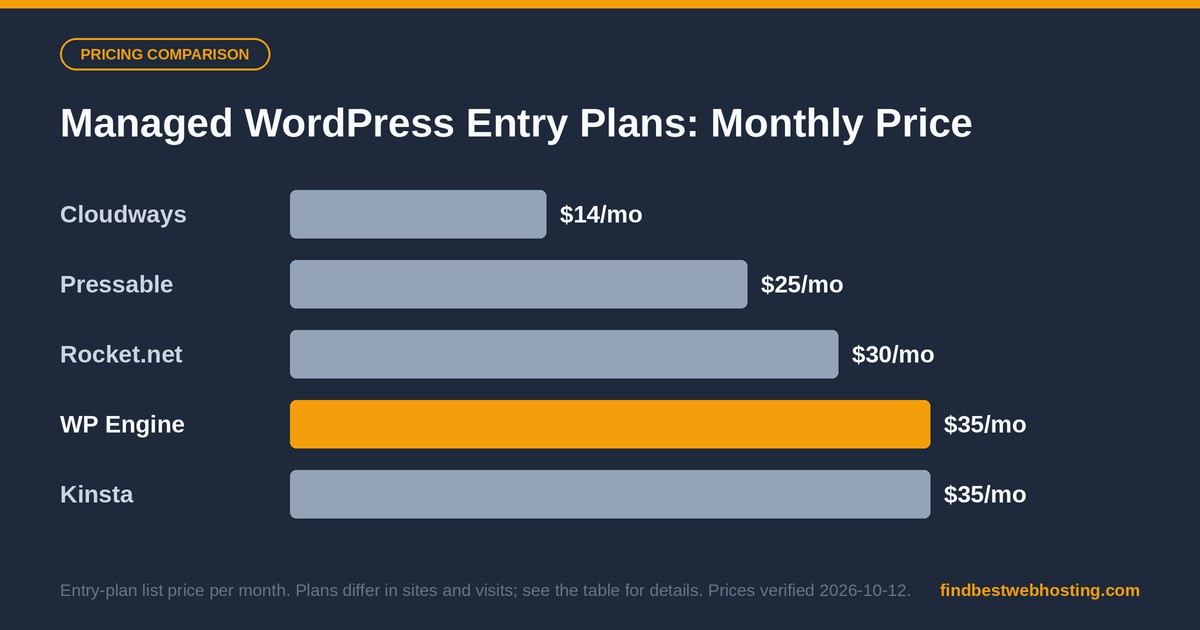
| Host | Best for | Starting price | Standout next to WP Engine | Get started |
|---|---|---|---|---|
| Pressable | Per-site pricing, agencies, WooCommerce | $25/mo ($250/yr) | $1.20 per 1,000 visits over plan; staging and sandbox on every plan | Visit Pressable → |
| Kinsta | Developer workflow, larger stores | $35/mo ($350/yr) | $0.50 per 1,000 visits over plan; Cloudflare-powered CDN on all plans | Visit Kinsta → |
| Rocket.net | Predictable cost, unmetered visits | $30/mo ($25/mo billed yearly) | No visit caps; free Redis; Enterprise Edge CDN | Read the review → |
| Cloudways | Flexible cloud, apps beyond WordPress | $14/mo | Pay-as-you-go; 3-day free trial, no card | Visit Cloudways → |
| WP Engine (for reference) | Agencies managing client sites | $35/mo ($28/mo billed yearly) | White-label reporting; 60-day money-back | Visit WP Engine → |
Pressable — Best for Per-Site Pricing and Agencies
Pressable is priced per site, with the same toolkit on every plan: staging, a sandbox, Jetpack Security, hourly database backups and free migrations. Overage on visits is $1.20 per 1,000 visits.
For agencies the per-site cost falls fast: Signature 4 is $90 a month for ten sites. Our Pressable pricing guide lists every plan, and Pressable for agencies covers cost per site and setup.
A planning note: Pressable lists a 30-day money-back guarantee, against WP Engine's 60 days, and its 100% SLA covers the network and infrastructure rather than every site on it.
- Per-site pricing that gets cheaper as you add sites
- Staging, sandbox and Jetpack Security on every plan
- Lower visit overage rate than WP Engine
Read our full Pressable review or the direct Pressable vs WP Engine comparison.
Kinsta — Best for Developer Workflow and Larger Stores
Kinsta runs sites in isolated containers on high-performance cloud infrastructure, with a Cloudflare-powered CDN and edge caching (260+ POPs per Kinsta) included on all plans. Developers get DevKinsta for local work, Git integration, SSH and WP-CLI.
Visit overage is $0.50 per 1,000 visits, and Kinsta's plugin rules are lighter than WP Engine's. Our Kinsta pricing guide covers every plan and add-on.
A planning note: Redis is a paid add-on at $100/site/month, so price it in if you run WooCommerce. Kinsta lists a 30-day money-back guarantee.
- Cloudflare-powered CDN with edge caching on all plans
- DevKinsta, Git integration, SSH and WP-CLI
- Lowest visit overage rate in this group
Read our full Kinsta review, the Kinsta vs WP Engine comparison or the WP Engine to Kinsta migration playbook.
Rocket.net — Best for Unmetered Visits and a Predictable Bill
Rocket.net does not meter visits: all plans are unmetered on traffic, with limits set by disk and bandwidth instead. It starts at $30/month, with Enterprise Edge CDN and Redis included on every plan.
That makes monthly costs easier to forecast than a visit-based plan, which suits a growing content site or a store with traffic spikes. Overages are listed at $2/GB for disk and $0.08/GB for bandwidth.
A planning note: WP Engine's agency tooling, such as white-label reporting, is deeper than Rocket.net's multi-site management, so agencies that rely on it should compare both.
- No visit caps on any plan
- Enterprise Edge CDN and Redis included
- Predictable pricing for spiky traffic
Read our full Rocket.net review or the direct Rocket.net vs WP Engine comparison.
Cloudways — Best for Flexibility Beyond WordPress
Cloudways is a managed cloud layer on top of providers such as DigitalOcean, AWS, Google Cloud, Vultr and Linode. You pick the provider, the region and the server size, and run WordPress alongside other apps.
Pricing starts at $14/month and follows usage rather than visit caps, and Cloudways offers a 3-day free trial, no credit card. That makes it easy to test before you move anything.
A planning note: Cloudways support covers the infrastructure, so WordPress-level issues such as plugin conflicts are yours to handle or to hand to a developer.
- Choice of five cloud providers and many regions
- Pay-as-you-go pricing from $14/month
- Room for non-WordPress apps
Read our full Cloudways review or the direct WP Engine vs Cloudways comparison.
When WP Engine Is Still the Right Call
WP Engine stays the better fit for agencies that use its client-management layer. White-label reporting and the Agency Partner Program's billing options suit agencies reselling hosting, and the 60-day money-back window gives you twice as long as most hosts here to test a migration.
Its plans also list 10 premium themes and Genesis Blocks, plus 30-day backup retention and phone support on higher-capacity plans. If those match how you work, stay, and read the WP Engine review for the detail.
How to Pick
Choose WP Engine if
- You manage client sites and use white-label reporting
- You want a 60-day window to test a move
- Phone support on higher plans matters to you
Choose an alternative if
- You want per-site pricing and a published overage rate (Pressable, $1.20 per 1,000 visits)
- You want the deepest developer workflow (Kinsta)
- You want unmetered visits (Rocket.net) or non-WordPress apps (Cloudways)
Three questions settle most cases: how many sites you run, how spiky your traffic is and whether you rely on a restricted plugin. Answer those and the table above points to one or two hosts.
Frequently Asked Questions
What is the best WP Engine alternative?
It depends on why you are comparing. Pressable fits agencies and WooCommerce stores that want per-site pricing and a lower visit overage rate, Kinsta fits developer-led teams and larger stores, Rocket.net fits sites that want unmetered visits, and Cloudways fits anyone who needs more than WordPress.
Is WP Engine still a good choice in 2026?
Yes, for agencies. WP Engine offers white-label reporting, a 60-day money-back guarantee, 30-day backup retention and phone support on higher-capacity plans, which is why it stays the right call for many agency workflows.
How do WP Engine's visit overage fees compare with other hosts?
WP Engine charges overage fees over your plan (its overage page lists $2 per 1,000 extra visits for older plan names, with no published Essential rate). Pressable lists $1.20 per 1,000 visits and Kinsta $0.50 per 1,000 visits, while Rocket.net does not meter visits at all.
Does WP Engine restrict plugins?
WP Engine keeps a list of disallowed plugins, mostly redundant caching and some security plugins its platform replaces. Check the list on wpengine.com before you migrate a site that depends on one.
How do I move from WP Engine to another host?
Most of the hosts here include free migrations, and our WP Engine to Kinsta playbook walks through a full move step by step. Test the new site on a staging URL and cut over DNS only when the checks pass.
The Bottom Line
WP Engine is a strong, agency-focused host, and these four alternatives each match a different reason for comparing. Pressable and Kinsta lead on price per visit and developer tooling, Rocket.net on unmetered visits, and Cloudways on flexibility.
Moving is easier than it sounds: most of these hosts include free migrations, and our WP Engine to Kinsta playbook shows the full sequence. For a wider shortlist, see our best WordPress hosting guide.
See Pressable Plans → Compare Kinsta Plans →
Sources: Our published reviews and comparisons of each host, plus WP Engine's plans page (wpengine.com/plans) and Kinsta's pricing page (kinsta.com/pricing), read 16 October 2026; visit overage rates per each host's documentation, read 12 October 2026. Hosts can change prices and terms, so confirm on their sites before you buy.
We earn a commission if you purchase through links on this page. This does not affect our editorial assessment. See our disclosure policy.