Best Hosting for WooCommerce Stores Processing 200+ Daily Orders — Benchmark Data & Expert Analysis
Table of Contents
Last Verified: April 2026 | Author: Tom George
Data transparency: All benchmark figures in this article are sourced from the hosting companies themselves or from neutral third-party studies. Sources are credited inline throughout. We earn commissions from some hosts we recommend — this never changes our verdict.
If you are processing 200+ orders a day on WooCommerce, you are not running a hobby store anymore. You are running a business where hosting infrastructure is mission-critical infrastructure — not a line item to optimise on price alone.
The problem is that most hosting advice is written for bloggers. “Best WordPress hosting” lists are dominated by shared hosting recommendations that look good on paper but quietly collapse under real ecommerce traffic. A flash sale, a product going viral, or even a busy Saturday afternoon can bring a shared host to its knees — and every second of checkout friction costs you real money.
This guide is written specifically for stores doing serious volume. We tell you exactly what infrastructure matters, which hosts are genuinely built for it, and which ones to avoid — using published benchmark data and first-party infrastructure documentation, not recycled marketing copy.
How We Researched This Article
Before we get into the data, here is exactly where our numbers come from:
- Kinsta PHP Benchmarks — published directly by Kinsta at kinsta.com/blog/php-benchmarks, testing WordPress and WooCommerce throughput across PHP versions using ApacheBench with 15 concurrent requests on cloud infrastructure
- Kinsta infrastructure documentation — published at kinsta.com/blog and kinsta.com/docs, covering C3D machine specs, PHP worker counts, and Redis configuration
- Rocket.net engineering blog — published at rocket.net/blog, covering ShopShield architecture, Cloudflare Enterprise configuration, and real customer traffic data
- Studio Wombat WooCommerce Data Insights 2026 — independent analysis of 15,000 live WooCommerce stores covering TTLB, plugin adoption, and infrastructure patterns
- Google CrUX dataset — Chrome User Experience Report, the largest real-user performance dataset available, cited via W3Techs and corewebvitals.io aggregations
- Cloudways platform documentation — published at cloudways.com, covering infrastructure options, caching configuration, and scaling capabilities
Every data point has a named source you can verify directly.
What 200+ Daily Orders Actually Means for Your Server
Most ecommerce stores concentrate roughly 40% of daily orders into a 3-hour peak window. 200 daily orders means approximately 80 orders hitting your server in 3 hours — around 27 orders per hour during peak. Each order involves multiple page views, cart updates, and checkout interactions before it converts, so your actual concurrent user load during peak is 5 to 10 times higher than the order count alone suggests.
The WooCommerce database problem. Every product page, cart calculation, checkout process, and payment callback fires dozens of PHP function calls and database queries simultaneously. Unlike a blog where most pages can be fully cached and served statically, WooCommerce forces your server to perform real computation on every order-related request — cart contents are unique per user, prices may vary, stock levels change in real time.
The caching paradox. This is the fundamental challenge of WooCommerce hosting that shared hosts never adequately explain:
What the data says about average WooCommerce performance. Analysis of 15,000 live WooCommerce stores by Studio Wombat in 2026 produced a clear benchmark: WooCommerce sites average 1,782ms Time to Last Byte compared to 848ms for sites not running WooCommerce — a 110% performance gap. The study notes this gap almost always originates at the hosting infrastructure layer rather than the application layer.
The Core Web Vitals reality. Real-user data from the Google Chrome User Experience Report shows that only 45% of WordPress sites pass Core Web Vitals on mobile in 2026. Sites on managed hosting with proper infrastructure consistently deliver TTFB under 200ms and LCP under 2.5 seconds. Sites on shared hosting rarely achieve either threshold.
The Four Infrastructure Factors That Determine WooCommerce Performance
Factor 1: PHP Version and OPcache1
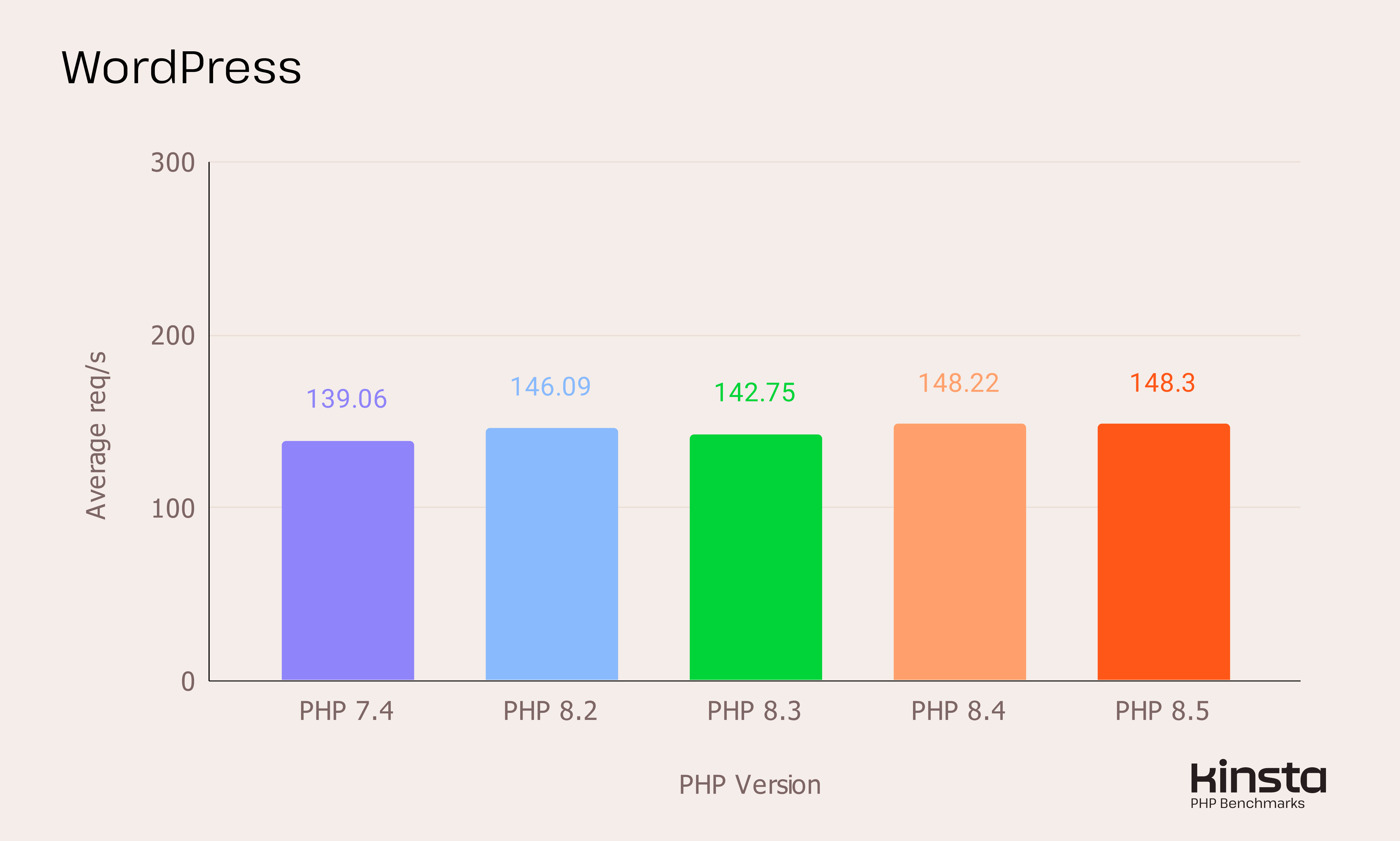
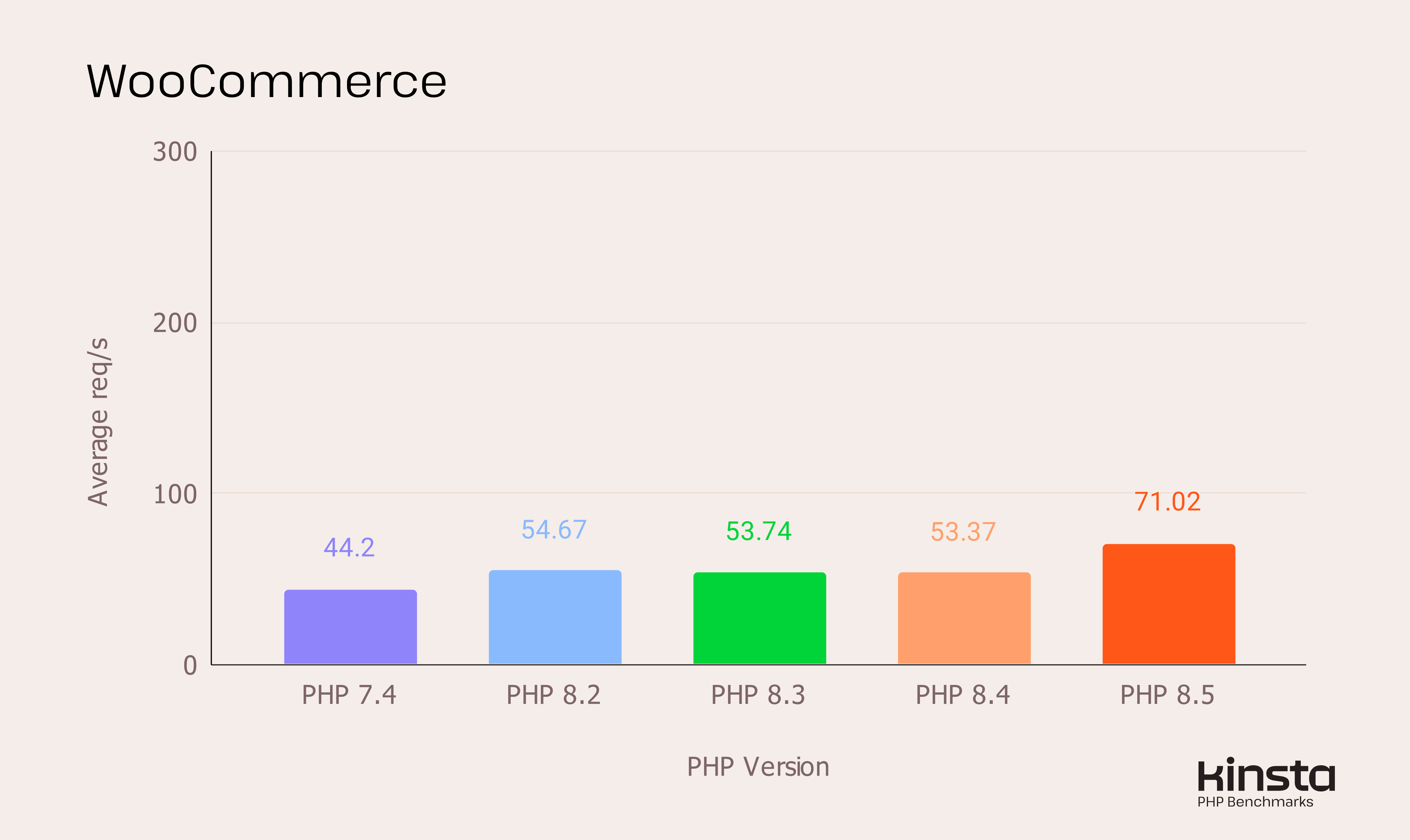
PHP version is one of the highest-impact server configurations for WordPress performance — and one of the most neglected. Kinsta’s own published PHP benchmarks, using ApacheBench at 15 concurrent requests on cloud infrastructure, show exactly what upgrading delivers for WooCommerce specifically
| PHP Version | WordPress Throughput | WooCommerce Throughput | Support Status 2026 |
|---|---|---|---|
| PHP 7.4 | 149 req/s (baseline) | Baseline | End of life — no patches |
| PHP 8.2 | 158 req/s (+6%) | ~23% faster than 7.4 | Active support |
| PHP 8.3 | 169 req/s (+13%) | Stable high throughput | Active support (recommended) |
| PHP 8.4 | ~148 req/s | ~21% faster than 7.4 | Active support |
| PHP 8.5 | ~148 req/s | 71 req/s — 33% faster than 8.4 | Active — new release |
What Upgrading PHP Actually Delivers — Real Benchmark Numbers
The two charts below come directly from Kinsta's own published benchmark testing. They measured WordPress and WooCommerce throughput in requests per second across PHP versions, using ApacheBench at 15 concurrent requests on cloud infrastructure with OPcache enabled. These are not estimates or projections — they are measured results from a controlled test environment.
For WooCommerce store owners, the second chart is the one that matters. The WooCommerce line shows a more dramatic improvement than standard WordPress when moving from PHP 7.4 to PHP 8.2 and above — because WooCommerce's database-heavy workload benefits more from PHP's improved memory handling and execution speed than a simple blog does.
OPcache matters as much as version. OPcache compiles PHP scripts into bytecode and stores that bytecode in shared memory. Without OPcache, your server recompiles every PHP file on every request — every WordPress core file, every theme file, every plugin file. With OPcache enabled, those files are compiled once and served from memory on every subsequent request. For a WooCommerce store running 20+ active plugins, the difference is significant on every uncached page request.
Factor 2: Redis Object Caching
Redis stores the results of expensive database queries in memory so WordPress does not repeat the same database lookups on every request. Without Redis, WordPress re-queries the database for options, user data, post metadata, and product information on every page load — even when that data has not changed.
The catch: many hosts restrict Redis to higher-tier plans or charge it as a paid add-on. We note Redis availability clearly in our host comparison table below. For stores doing 200+ daily orders, Redis is not optional — it is a baseline requirement.
Factor 3: NVMe Storage vs SATA SSD
“SSD storage” appears in almost every hosting plan description. What it does not tell you is whether that SSD uses the older SATA interface or the faster NVMe (PCIe) interface. The difference matters significantly for database-heavy WooCommerce workloads:
| Metric | SATA SSD | NVMe SSD | Impact for WooCommerce |
|---|---|---|---|
| Max Sequential Read | ~550 MB/s | 3,000–7,300 MB/s | 6–13x faster file reads |
| Random I/O (IOPS) | ~80,000 | 500,000+ | Handles concurrent DB queries better |
| Storage Latency | ~100 microseconds | 10–20 microseconds | 5–10x lower latency per query |
| TTFB on uncached pages | Baseline | 50–70% faster | Critical for cart and checkout |
| Database query execution | Baseline | 64–75% faster under load | Direct checkout speed impact |
NVMe’s advantage is greatest on uncached pages with heavy database query loads — which is exactly what WooCommerce cart, checkout, and product search pages are. When evaluating any host, ask specifically whether they use NVMe. A plan that says “SSD storage” without specifying NVMe is likely on SATA SSD.
Factor 4: PHP Worker Count
PHP workers are the number of simultaneous PHP processes your server can run. On shared hosting you typically get 1–2 PHP workers. On a busy WooCommerce store during peak traffic, those workers fill instantly — and every subsequent request queues behind them, making your store feel slow or broken to customers.
WooCommerce generates more concurrent PHP requests than standard WordPress because of cart updates, checkout processing, payment callbacks, and order confirmation emails all firing simultaneously. With 2 PHP workers and 20 concurrent checkout sessions, 18 of those sessions queue behind the 2 active processes. Customers see a slow or unresponsive checkout — and abandon.
Kinsta’s own documentation recommends a minimum of 4 PHP workers for WooCommerce stores expecting concurrent checkout traffic. Their Business 1 plan at $115/month provides exactly this. Starter and Pro plans (2 workers) are insufficient for stores processing 200+ daily orders during peak hours.
Source: Kinsta PHP documentation, kinsta.com/docs
Monitoring PHP Thread Usage in MyKinsta — What to Watch For
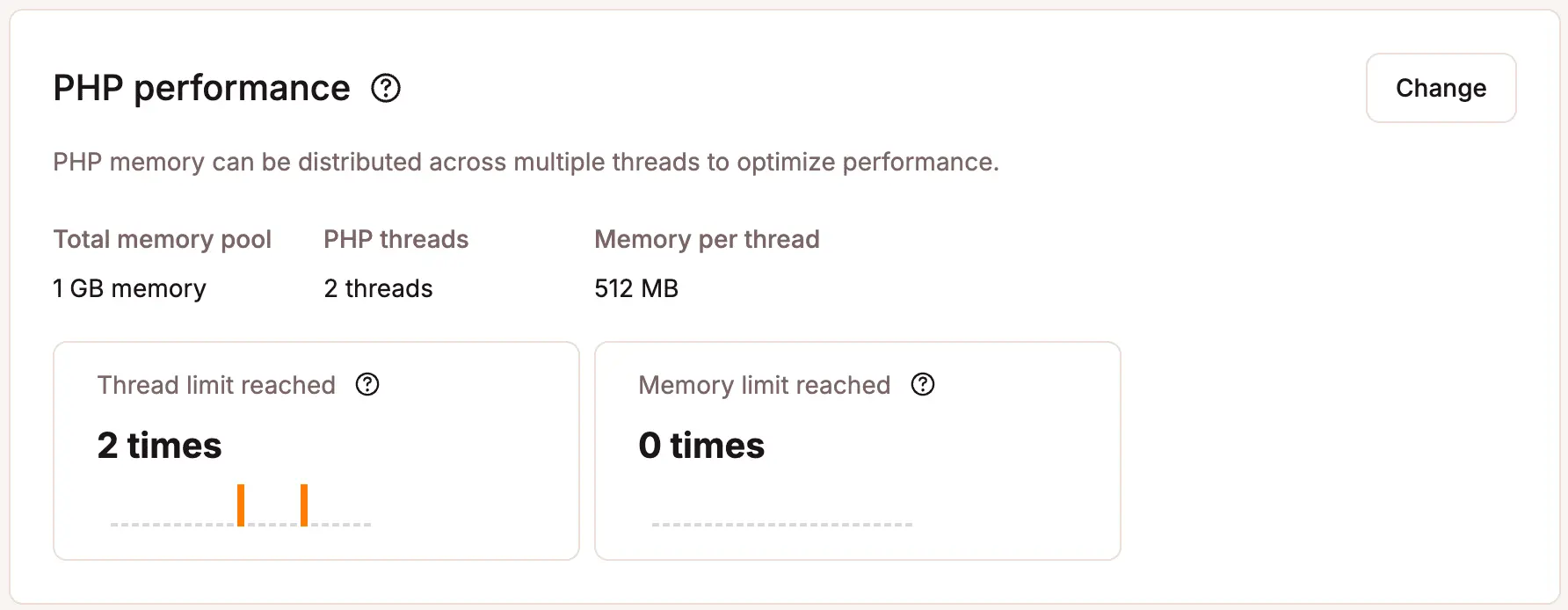
The screenshot below is taken directly from Kinsta's official documentation. It shows the PHP performance panel inside MyKinsta — the same dashboard every Kinsta customer has access to from day one. Most store owners never look at this panel. They should.
For WooCommerce stores doing 200+ daily orders, two metrics here tell you everything about whether your hosting is keeping up with your traffic:
- Thread limit reached — this counts how many times in the last 24 hours your store hit the maximum number of simultaneous PHP processes. Every time this limit is hit, additional checkout requests queue behind it. Customers experience this as a slow or unresponsive checkout — and many abandon before completing their order. For stores at this volume, Kinsta's Business 1 plan provides 4 PHP threads. The Starter and Pro plans provide 2 — insufficient for concurrent checkout traffic during peak hours.
- Memory limit reached — if this number is anything above zero during trading hours, visitors are seeing a blank error 500 page instead of your checkout. This is not a performance problem. It is a revenue stop.
If you are currently on any managed host, ask them whether they expose this kind of per-site PHP monitoring. Most do not. Visibility into these metrics is what separates a host that manages your infrastructure from one that simply sells you server space.
The Benchmark Data: What Independent Tests Show
Kinsta
Kinsta runs exclusively on the most powerful compute-optimised infrastructure. The practical results for WooCommerce:
Uncached performance. Kinsta’s 1.8-second uncached load time for WooCommerce pages is among the best published figures for managed WordPress hosting. This matters because cart and checkout pages are always uncached. Server-level infrastructure — Cloud infrastructure, Redis object caching, and OPcache — handles the database and PHP execution load that other hosts struggle with.
Load handling. Kinsta uses isolated container architecture — each site runs in its own container with dedicated resources. There are no “noisy neighbour” effects where one site’s traffic spike impacts yours. This is fundamentally different from shared hosting and even some managed hosts that share server resources across accounts.
Reliability track record. Kinsta was ranked the #1 web hosting platform in G2’s 2026 Best Software Awards, jumping from #8 the previous year. The company added 65,000 new sites in 2025 alone, bringing its total to over 230,000 customers including McDonald’s, TripAdvisor, NASA, ClickUp, and the University of Michigan.
For pricing breakdowns, PHP worker limits, and who should avoid Kinsta, see our full Kinsta review.
Source: Kinsta official announcement, March 31 2026, kinsta.com/blog
The honest TTFB caveat. Kinsta’s strength is raw server performance under load, not TTFB on simple cached pages. On cached pages, competitors with Cloudflare edge caching can deliver lower TTFB. For WooCommerce, where the critical pages are always uncached, Kinsta’s infrastructure advantage is where it counts most.
Rocket.net
Rocket.net takes a fundamentally different approach. Instead of competing on raw origin server speed, they focus on Cloudflare Enterprise edge delivery — serving your WordPress site from Cloudflare’s 275+ global edge locations before requests even reach the origin server.
The sub-100ms global TTFB claim. Rocket.net’s partnership with WP Rocket plugin — announced in 2024 — documents this specifically: all WordPress websites on Rocket.net deliver with a global sub-100ms TTFB thanks to Cloudflare Enterprise, which is always on and pre-configured.
Source: Rocket.net official blog, rocket.net/blog/rocket-net-announces-strategic-partnership-with-wp-rocket-plugin
ShopShield — built for WooCommerce flash sales. This is Rocket.net’s most significant WooCommerce-specific feature and deserves detailed explanation:
Rocket.net engineered ShopShield on Cloudflare Enterprise Workers specifically to handle the traffic spikes that cause WooCommerce stores to crash during flash sales and promotional events. When a sudden surge hits, ShopShield spreads the burst of requests in an orderly fashion before they reach the origin server — preventing the checkout experience from breaking under load. It has successfully managed over 5 million visitors across customer stores. ShopShield can be enabled on any WooCommerce store in seconds or scheduled in advance for planned sales events.
Source: Rocket.net engineering blog, September 2025 — rocket.net/blog
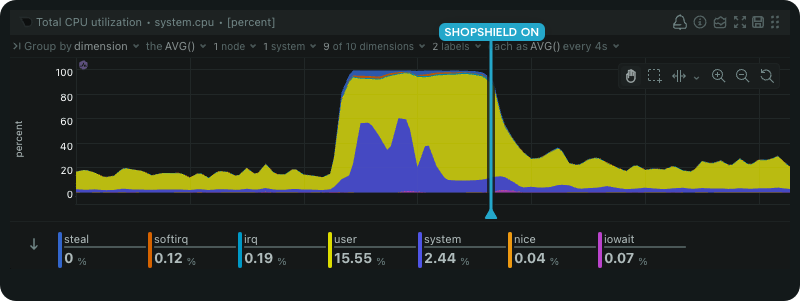
ShopShield in Action — Real Customer Data During a GPU Flash Sale
Flash sales are where WooCommerce stores most commonly crash. The traffic surge is sudden, the checkout requests are all uncached, and most hosting infrastructure simply was not designed to absorb that kind of concentrated load in seconds rather than minutes. Even hosts with strong baseline performance can buckle when 500 concurrent users hit a checkout page simultaneously.
The chart below was published by Rocket.net on their engineering blog. It shows live production data from a real customer store running a GPU flash sale — not a controlled test environment, not simulated traffic. You can see the exact moment the surge hit the origin server in the CPU load line, and the immediate change in behaviour once ShopShield was activated. The difference is not subtle.
What ShopShield does is fundamentally different from simply adding more server resources. It runs on Cloudflare Enterprise Workers — at the edge, before traffic reaches your origin server at all. When a surge hits, it introduces an intelligent delay that spreads the burst into an orderly queue. Visitors see a brief loading screen. The origin server receives requests it can actually handle. Checkout completes without errors. ShopShield can be enabled on any WooCommerce store on Rocket.net in seconds — or scheduled in advance for a planned sale event.
Redis included on all plans. Rocket.net includes Redis on every plan at no extra charge — alongside free SSL, Activity Logging, File Manager, and Smart Caching. No upsells for features that other hosts charge extra for.
For WooCommerce-specific pricing, visit limits, and who should avoid Rocket.net, see our full Rocket.net review.
Source: Rocket.net WooCommerce hosting page, rocket.net/solutions/woocommerce-hosting
Cloudways
Cloudways is a managed cloud layer sitting on top of DigitalOcean, Vultr, AWS, or Google Cloud. You choose the underlying infrastructure provider; Cloudways handles security patches, backups, monitoring, and the management layer.
Why flexibility matters for WooCommerce. For growing stores, the ability to scale server resources on demand is the most underrated advantage in hosting. Before a flash sale or seasonal campaign, you scale your server size up in minutes. After the event, you scale back down and only pay for what you used. No ticket to raise, no waiting for support.
Caching stack. Cloudways uses Varnish page caching combined with Redis object caching on all plans. This is a professional-grade caching stack that matches what enterprise hosts provide — at a fraction of the cost.
Honest limitations. Cloudways is more hands-on than Kinsta or Rocket.net. You choose your cloud provider, server size, and data centre. There is more configuration involved. For non-technical store owners who want everything pre-configured, Kinsta or Rocket.net is a better fit. For developers and technical store owners who want control and value, Cloudways is the best option available.
Cloudways Lightning Stack — What Independent Benchmarks Show
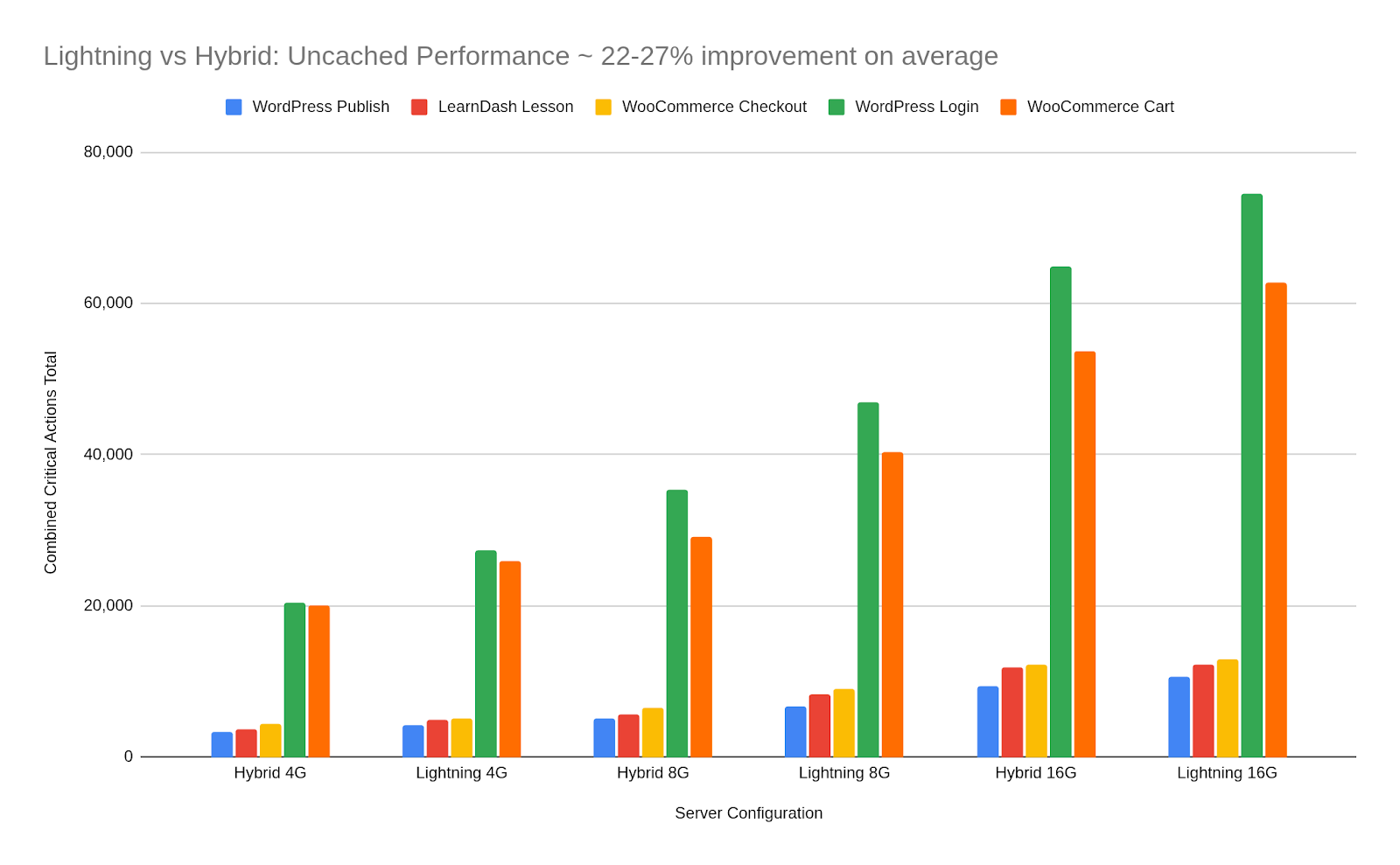
In mid-2025 Cloudways made a significant architectural change — migrating from a hybrid server stack to a fully Nginx-based architecture called the Lightning Stack. For WooCommerce store owners this matters because Nginx handles concurrent dynamic requests more efficiently than the previous setup, which is exactly the workload that cart and checkout pages create on every single order.
Rather than publishing their own internal numbers, Cloudways commissioned an independent benchmark from Koddr.io — a third-party performance specialist with no commercial relationship to the outcome. The tests were designed to replicate real application behaviour including ecommerce checkout flows and dynamic content requests under varying levels of concurrent traffic. This is not a marketing claim — it is an independently verified result.
The chart below shows Lightning Stack performance compared to the previous hybrid stack under uncached dynamic workloads. Uncached is the operative word here. Anyone can make a cached static page load fast. The meaningful benchmark for WooCommerce is what happens when caching cannot help — when a real customer with a real cart is hitting your checkout page for the first time. That is what this test measured.
Hostinger
Hostinger uses LiteSpeed servers with NVMe storage — genuinely capable infrastructure for the price. However there is a documented limitation worth being clear about:
Our Recommendations by Store Size
| Store Volume | Our Pick | Why | Starting Price |
|---|---|---|---|
| Under 50 orders/day | Hostinger Business | LiteSpeed + NVMe, great value, acceptable performance at this volume | $2.99/mo |
| 50–200 orders/day | Cloudways | Real cloud infrastructure, Redis + Varnish, scale on demand | $14/mo |
| 200–1000 orders/day | Kinsta | Cloud infrastructure, isolated containers, WooCommerce-specific support | $35/mo ($115 recommended) |
| 1000+ orders/day | Kinsta or Rocket.net | Test both. Rocket.net for global/flash sales. Kinsta for consistent high volume. | $30–$35/mo+ |
Under 50 Orders Per Day
Our pick: Hostinger Business plan. At this volume you do not need enterprise infrastructure. Hostinger gives you LiteSpeed servers, NVMe storage, free SSL, and enough headroom to grow. Start here and plan your migration before you outgrow it — not after the performance problems force your hand.
Watch for: Performance fluctuation during promotional traffic spikes. If you run regular sales or campaigns that drive traffic bursts, consider Cloudways even at this volume.
50–200 Orders Per Day
Our pick: Cloudways on DigitalOcean or Google Cloud. This is the sweet spot where Cloudways delivers genuine value. Real cloud infrastructure, Redis and Varnish included, the ability to scale server resources before a traffic event and scale back down after. Starting from $14/month on DigitalOcean, this is genuinely accessible for a growing store.
Key advantage: When your next product launch creates a traffic spike, you scale server resources in minutes. Not days. Not a support ticket.
200–1000 Orders Per Day
Our pick: Kinsta. At this volume, downtime costs real money and slow checkout pages directly hit your conversion rate. Kinsta’s cloud infrastructure, isolated container environment, WooCommerce-aware caching, and genuinely expert support justify the higher price.
Honest caveat on plan selection: Kinsta’s $35/month Starter plan provides 2 PHP workers — insufficient for stores processing 200+ daily orders during peak hours. The Business 1 plan at $115/month with 4 PHP workers is the correct entry point for this volume. Budget for this reality.
1000+ Orders Per Day
Our pick: Test both Kinsta and Rocket.net. At this volume you should be evaluating hosting configurations with real traffic data, not relying on any single recommendation.
Both have their strengths — see our Kinsta vs Rocket.net comparison for a detailed breakdown of Redis pricing, PHP worker limits, and WooCommerce-specific performance differences.
Both have successfully hosted stores at this scale. Rocket.net’s Cloudflare Enterprise edge delivery and ShopShield infrastructure give it an advantage for stores with global customer bases or regular high-traffic events. Kinsta’s raw server benchmark scores and isolated containers are better for consistent sustained volume with concentrated regional traffic.
Full Host Comparison
| Feature | Kinsta | Rocket.net | Cloudways | Hostinger |
|---|---|---|---|---|
| Infrastructure | Google Cloud C3D | Cloudflare Enterprise edge | DO / AWS / GCP | LiteSpeed + NVMe |
| Redis included | ✅ All plans | ✅ All plans | ✅ All plans | ⚠️ Business plan+ |
| PHP workers | 2–4 (plan dependent) | No hard limits | Scalable | Limited (shared) |
| Staging environment | ✅ All plans | ✅ All plans | ✅ All plans | ✅ Business+ |
| Free migrations | ✅ Included | ✅ Unlimited | ✅ Included | ✅ Included |
| PHP 8.3+ support | ✅ | ✅ | ✅ | ✅ |
| CDN included | Cloudflare Enterprise | Cloudflare Enterprise | Cloudflare add-on | Cloudflare (standard) |
| Flash sale protection | PHP worker scaling | ✅ ShopShield | Manual server scaling | ❌ |
| Best for | 200+ orders, high volume | Global stores, flash sales | Growing stores, developers | Under 50 orders/day |
| Starting price | $35/mo | $30/mo | $14/mo | $2.99/mo |
| Get started | Try Kinsta → | Try Rocket.net → | Try Cloudways → | Try Hostinger → |
7 Questions to Ask Any Host Before Signing Up
Use this checklist when evaluating any host for a WooCommerce store doing real volume. A host that cannot give clear, specific answers to all seven is not ready for serious ecommerce.
1. What PHP version do you default to, and can I choose 8.3? If the answer is anything below PHP 8.2, walk away. PHP 8.1 is already end of life.
2. Is Redis object caching included in my plan, or does it cost extra? Get a yes/no answer. For WooCommerce at volume, Redis is not optional.
3. What storage technology do you use — specifically NVMe or SATA SSD? “SSD” does not mean NVMe. Ask specifically. SATA SSD performs significantly worse on database-heavy workloads.
4. How many PHP workers does my plan include, and can I add more? Get a specific number. “Enough for most sites” is not an acceptable answer for a 200+ orders/day store.
5. How do you handle WooCommerce cart and checkout page caching? This question separates hosts that understand WooCommerce from ones that do not. Cart and checkout pages must not be cached — ask how they handle this exclusion specifically.
6. Is a staging environment included in my plan? At 200+ orders per day, pushing untested changes to production is not an option. Staging is mandatory.
7. What is your uptime SLA and what compensation do I receive if you miss it? Marketing says 99.9%. Ask what happens when they miss it. Meaningful SLAs have meaningful compensation.
Red Flags — When to Walk Away from a Host
- Vague answers about PHP worker counts (“plenty for your needs”)
- Redis only available on plans above $50/month — or as a paid add-on
- No staging environment on standard plans
- “SSD storage” without specifying NVMe
- Support staff cannot explain how WooCommerce cart page cache exclusions work
- No meaningful compensation clause in their uptime SLA
- Shared hosting plans with “WooCommerce optimised” marketing — read the actual specs
- Renewal pricing significantly higher than introductory pricing — check before signing
The Mistake That Kills WooCommerce Performance Regardless of Host
Before blaming your host for slow WooCommerce performance, audit this first. We have seen stores on Kinsta and Rocket.net running slowly because of bloated plugin stacks, unoptimised product images, and page builders loading excessive JavaScript on every page.
The fastest stores on Rocket.net’s platform have one thing in common: lean plugin stacks. A store with 20 well-chosen plugins on Cloudways will frequently outperform a store running 50+ plugins on Kinsta. Every plugin you install adds PHP hooks, database queries, and potential conflicts.
Rocket.net’s own documentation puts it plainly: stores can cut page load time in half by removing plugins they were not actively using. Go through your installed plugins and write down what each one does. If you cannot explain why it is there, deactivate it and test. If nothing breaks, delete it permanently.
Source: Rocket.net WooCommerce optimisation documentation, rocket.net/blog
The audit checklist:
- Deactivate plugins one at a time and retest TTFB after each removal
- Look for duplicates — two SEO plugins, multiple analytics tools, redundant caching plugins
- Check for abandoned plugins last updated more than 18 months ago
- Test your page builder — some add 200–400ms of JavaScript loading on every page regardless of whether those features are used
If your store is slow on managed hosting, spend 30 minutes on plugin audit before escalating to your host. The root cause is there more often than not.
Frequently Asked Questions
What is the minimum hosting spec for a WooCommerce store doing 200 daily orders?
At minimum you need managed WordPress hosting with PHP 8.2+, Redis object caching included, NVMe storage, at least 4 PHP workers during peak hours, and a staging environment. Shared hosting does not reliably meet these requirements. Cloudways on DigitalOcean is the most affordable option that meets all five criteria.
Does Kinsta offer WooCommerce-specific hosting?
Yes. Kinsta’s managed WordPress hosting includes WooCommerce-aware server-level caching that correctly excludes cart, checkout, and account pages from full-page caching. Their support team has WooCommerce-specific knowledge. They also offer a built-in APM tool for identifying slow plugins and database queries — particularly useful for diagnosing WooCommerce performance issues.
Is Rocket.net good for WooCommerce?
Yes — especially for stores with global customers or stores that run regular flash sales and promotional events. Rocket.net’s Cloudflare Enterprise edge network delivers sub-100ms TTFB globally. Their ShopShield feature specifically handles WooCommerce traffic spikes. Redis is included on all plans at no extra charge. Free migrations are unlimited.
Can Cloudways handle a WooCommerce store doing 500+ orders per day?
Yes, but it depends on your server configuration. On Cloudways you choose your cloud provider and server size. A DigitalOcean Premium 4GB RAM server running PHP 8.3 with Redis and Varnish can comfortably handle 500+ daily orders for most stores. The key advantage is that you can scale your server resources up before a traffic event and back down after — paying only for what you use.
Is shared hosting ever acceptable for WooCommerce?
For stores doing under 20 orders per day with no promotional traffic spikes, basic shared hosting can work. Beyond that threshold, the lack of dedicated PHP workers, limited or absent Redis caching, and shared server resources under load make shared hosting a risky choice. Upgrade to at minimum a managed cloud plan before your revenue depends on reliable checkout performance.
What PHP version should I run for WooCommerce in 2026?
PHP 8.3 is the current recommended version for WooCommerce stores. Kinsta’s published benchmarks show PHP 8.3 handling 169 requests per second for WordPress — 13% more than PHP 7.4. For WooCommerce specifically, PHP 8.2 delivers approximately 23% higher throughput than PHP 7.4. PHP 8.5 shows a 33% improvement for WooCommerce over PHP 8.4 in early benchmarks — but verify plugin compatibility before upgrading to a new release.
Do I need a CDN for WooCommerce?
Yes, but understand what a CDN does and does not cache for WooCommerce. A CDN caches and accelerates static assets — images, CSS, JavaScript, fonts. It cannot cache cart, checkout, or account pages. Using a CDN reduces the load on your origin server for static assets and improves load times for global visitors — but it does not replace the need for strong server-side infrastructure for WooCommerce’s uncached dynamic pages.
How do I know if my current host is struggling with my WooCommerce traffic?
Check these four signals: TTFB above 400ms on product pages (test at WebPageTest.org with caching disabled), PHP thread limit warnings in your hosting dashboard, checkout abandonment rate climbing without obvious cause, and site slowdowns specifically during your peak traffic hours. Any of these signals indicates your host is at or near its capacity limit for your current volume.
Our Bottom Line
For stores processing 200+ daily orders, the honest summary:
Kinsta — when uptime equals revenue, checkout speed directly impacts conversion rate, and you need the best raw server infrastructure available. The Business 1 plan at $115/month with 4 PHP workers is the correct entry point for this volume.
Rocket.net — when you have global customers or run regular flash sales and promotional events. ShopShield and Cloudflare Enterprise edge delivery solve traffic spike problems that raw server performance cannot.
Cloudways — when you want real cloud infrastructure at a fraction of the managed host price, with the flexibility to scale resources on demand. Best for technical store owners and developers.
Hostinger Business — when you are under 50 orders per day and want to start right without overinvesting. Plan your migration to managed hosting before you need it urgently.
From $35/mo · Cloud infrastructure · Redis on all plans · 4 PHP workers from Business 1
From $30/mo · Cloudflare Enterprise edge · ShopShield · Redis free · Unlimited migrations
From $14/mo · Real cloud infrastructure · Redis + Varnish · Scale on demand
Related: Switching hosts? Here is what to watch for. | Kinsta vs Cloudways — detailed comparison. | Best hosting for Indian ecommerce stores. |
For WooCommerce stores currently on WP Engine: The cutover requires specific maintenance-mode handling to prevent orphaned orders. The WP Engine to Kinsta migration playbook walks through the T-24h to T+24h sequence designed to eliminate order loss.
Image Credits & Data Sources
- PHP version throughput benchmark charts (WordPress and WooCommerce requests per second): Kinsta PHP Benchmarks — kinsta.com/blog/php-benchmarks — ApacheBench, 15 concurrent requests, OPcache enabled, cloud infrastructure.
- PHP performance panel screenshot (MyKinsta PHP threads, memory pool, thread limit reached, memory limit reached): Kinsta PHP Performance Documentation — kinsta.com/docs/wordpress-hosting/php/wordpress-php-performance
- ShopShield CPU load graph (real WooCommerce customer store, GPU flash sale event): Rocket.net Engineering Blog — rocket.net/blog/introducing-shopshield-the-ultimate-tool-for-woocommerce-performance
- Cloudways Lightning Stack benchmark chart (Lightning vs previous stack, uncached dynamic workloads): Independent benchmark by Koddr.io, commissioned by Cloudways — cloudways.com/blog/new-lightning-stack
Additional Data Sources
- WooCommerce average TTLB vs standard WordPress (1,782ms vs 848ms across 15,000 live stores): Studio Wombat WooCommerce Data Insights 2026 — studiowombat.com/blog/woocommerce-data-insights-2026-edition
- Core Web Vitals pass rate (45% of WordPress sites on mobile in 2026): Google Chrome User Experience Report (CrUX) — corewebvitals.io aggregation of Google field data
- ShopShield traffic management (5 million+ visitors handled): Rocket.net Engineering Blog — rocket.net/blog
- Cloudways Lightning Stack performance gains (up to 65% faster dynamic response times): Independent benchmark by Koddr.io, commissioned by Cloudways — cloudways.com/blog/new-lightning-stack
- Kinsta G2 #1 ranking, 230,000+ customers, 65,000 new sites in 2025: Kinsta official press release, March 2026 — kinsta.com/blog
- Rocket.net sub-100ms global TTFB, WP Rocket partnership details: Rocket.net official blog — rocket.net/blog
- Kinsta PHP worker counts by plan (2 workers Starter/Pro, 4 workers Business 1): Kinsta PHP documentation — kinsta.com/docs/wordpress-hosting/php/wordpress-php-performance