Self-Hosted AI Tools on VPS — Hetzner vs Vultr vs DigitalOcean vs Contabo Compared
Four Providers, Tested on What AI Workloads Actually Need
Most "best VPS" guides benchmark WordPress. This one doesn't. We compared Hetzner, Vultr, DigitalOcean, and Contabo on the RAM, CPU, and storage specs that determine whether Ollama and n8n actually run.
Jump to a Section ▾
Table of Contents
Last Verified: April 2026 | Author: Tom George
Data transparency: Infrastructure specs, pricing, and benchmark data in this article are sourced from the VPS providers themselves and from neutral third-party benchmark studies. Sources are credited at the bottom of this article. We earn commissions from some hosts we recommend — this never changes our verdict.
Something changed quietly in 2025. Running AI tools on your own server stopped being a hobby project and became a legitimate cost optimisation strategy for developers, small businesses, and solo operators.
The numbers make the case clearly. A commercial AI stack combining ChatGPT Plus, GitHub Copilot, a vector database, and API costs runs $390–$690+ per month for a small team. A self-hosted stack running Ollama, n8n, and Open WebUI on a $20–$40/month VPS covers most of the same ground — with your data staying on your own infrastructure, no per-token billing, and no usage caps.
The catch is that most “best VPS” guides are written for WordPress sites or simple web apps. Self-hosted AI tools have fundamentally different requirements — they are RAM-hungry, CPU-intensive, and sensitive to storage speeds in ways that a typical WordPress benchmark does not reveal.
This guide is written specifically for running AI workloads. We compare Hetzner, Vultr, DigitalOcean, and Contabo on the metrics that actually matter for Ollama, n8n, LocalAI, and similar tools — using published benchmark data and official infrastructure specifications.
How We Researched This Article
Sources used in this article:
- VPS benchmark data — independent benchmark comparisons published at aimultiple.com, comparing CPU events per dollar, disk I/O, and network performance across providers
- Official infrastructure documentation — published by Hetzner, Vultr, DigitalOcean, and Contabo on their own sites
- Ollama and n8n official documentation — RAM and CPU requirements published at ollama.com and n8n.io
- Contabo engineering blog — published at contabo.com/blog, covering Ollama and n8n integration on VPS
- Independent cost analysis — published at use-apify.com, documenting real $12–$25/month self-hosted AI stack costs
- DigitalOcean official comparison documentation — published at digitalocean.com, covering infrastructure specs and positioning vs Hetzner and Vultr
What Self-Hosted AI Tools Actually Need From a VPS
Before comparing providers, let us be precise about what your VPS actually needs to handle.
The RAM problem. This is where most newcomers get caught out. VPS providers advertise entry plans starting at $4–$6/month — but those plans typically have 1–2 GB RAM. You cannot run Ollama on 2 GB RAM. The minimum recommended RAM for running a 7B parameter model like Llama 3.1 8B comfortably alongside n8n is 8 GB. Most advertised starting prices are for plans that are genuinely useless for this workload.
Most VPS providers show plans starting from $4–6/month. A 1 GB RAM plan is not enough for Ollama — you will hit memory errors before the model fully loads. Minimum recommended spec for a self-hosted AI stack: 4 vCPU / 8 GB RAM. That is typically 3–4x the advertised starting price. Budget accordingly before comparing providers.
Source: use-apify.com self-hosted AI stack cost analysis, 2026
The three hardware requirements that actually matter:
1. RAM — The Non-Negotiable Minimum
RAM determines which AI models you can run and how many simultaneous requests you can handle. Here is the practical breakdown by model size:
| Model Size | Examples | Minimum RAM | Recommended RAM |
|---|---|---|---|
| 3B parameters | Phi-3 Mini, Gemma 3B | 4 GB | 8 GB (with n8n running) |
| 7B parameters | Llama 3.1 8B, Mistral 7B | 8 GB | 16 GB (comfortable) |
| 13B parameters | Llama 2 13B, CodeLlama 13B | 16 GB | 32 GB |
| Multiple models | Router stack, agent workflows | 32 GB | 64 GB+ |
2. CPU — Cores and Clock Speed Both Matter
Without a GPU — which most VPS plans do not include — all inference runs on CPU. CPU speed directly determines how fast your AI tools generate responses. For n8n automation workflows that call Ollama, slow CPU means slow workflow execution.
High-frequency compute instances — available on Vultr specifically — offer 3+ GHz clock speeds rather than the standard 2–2.5 GHz. For CPU-bound AI inference, this single factor can improve response times by 30–50%.
3. Storage — NVMe vs Standard SSD
AI models are large files. Llama 3.1 8B quantized is approximately 4.7 GB. Loading a model from storage into RAM happens every time Ollama starts or when memory pressure causes a model unload. On standard SSD this can take 30–60 seconds. On NVMe this drops to 5–10 seconds.
For development workflows where you switch between models frequently, this difference is significant. All four providers in this comparison offer NVMe storage — but at different price points and plan tiers.
The Four Providers — What They Actually Offer
Hetzner
Hetzner is a German cloud provider that has built a devoted following among developers and self-hosters by offering significantly more hardware for the money than US-based competitors. For European deployments or cost-sensitive workloads, it is consistently the value leader.
The value case in real numbers. Hetzner delivers the best compute value per dollar of any provider in this comparison — see the full CPU-events-per-dollar figures in the Benchmark Data section below. Even after Hetzner raised prices by 30–37% in April 2026 due to DRAM costs, a Hetzner 4 vCPU / 8 GB server at approximately €16/month still outperforms DigitalOcean and Vultr servers that cost significantly more.
Source: aimultiple.com VPS benchmark study, 2026
For self-hosted AI specifically. Hetzner’s CX21 plan provides 4 GB RAM — which is the minimum for small models. The CX31 at approximately €9.68/month gives you 8 GB RAM — exactly the sweet spot for running Llama 3.1 8B with n8n. For users who want to run heavier workloads, the CCX23 dedicated CPU plan provides 8 vCPU / 32 GB RAM at prices that would buy you 4 GB RAM plans at AWS or Google Cloud.
Honest limitations. Hetzner’s data centres are primarily in Germany and Finland, with US data centres in Hillsboro, Oregon and Ashburn, Virginia. If your users are primarily in Asia-Pacific or South America, Hetzner has no infrastructure there. Ticket support response times can stretch beyond 24 hours on weekends. New accounts sometimes require manual ID verification taking 1–3 business days. And there is no managed database service — you manage everything yourself.
Bandwidth. Hetzner includes 20 TB bandwidth per month on most plans. DigitalOcean and Vultr typically include 2–4 TB. For downloading large AI models repeatedly or serving inference to multiple users, this matters.
Vultr
Vultr is a US-based cloud provider with 32 data centre locations worldwide — the largest global footprint of any provider in this comparison. Their High Frequency compute instances, running at 3+ GHz, are the best CPU option available for AI inference without a GPU.
High Frequency compute — the AI workload differentiator. Standard VPS instances typically run at 2.0–2.5 GHz. Vultr’s High Frequency instances use NVMe storage and 3+ GHz processors. For CPU-bound AI inference where every cycle counts, this is the most important differentiator Vultr offers. An inference task that takes 30 seconds on a standard 2 GHz VPS may take 18–20 seconds on a 3 GHz High Frequency instance — a meaningful difference for interactive workflows.
Global reach. With 32 regions including locations in APAC, Latin America, Africa, and the Middle East, Vultr is the best choice for teams with globally distributed users or for developers who need low-latency inference from multiple geographic locations.
Pricing reality. The High Frequency 2 vCPU / 4 GB RAM plan starts at $24/month. The 2 vCPU / 8 GB RAM plan is $48/month. These prices are higher than Hetzner for equivalent specs but include the high-frequency CPU premium. For pure AI inference performance, the premium is justifiable. For cost-sensitive deployments, Hetzner delivers more value.
DigitalOcean
DigitalOcean has built its reputation on exceptional developer experience — documentation, tutorials, community, and managed services that reduce the operational burden of running production applications. For developers who are new to VPS hosting or who want to spend less time managing infrastructure, this matters.
The developer experience advantage. DigitalOcean’s documentation is widely regarded as the best in the industry. Their tutorials cover practically every self-hosted application setup including Ollama, n8n, and Docker-based AI stacks. For a developer setting up a self-hosted AI environment for the first time, the time saved by good documentation can easily justify higher server costs.
Managed services. DigitalOcean offers managed PostgreSQL, MySQL, Redis, and Kubernetes — services that Hetzner does not provide natively. If your AI workflow includes a vector database, managed Redis for caching, or Kubernetes for orchestrating multiple services, DigitalOcean’s managed offerings reduce operational complexity significantly.
The honest value problem. Independent benchmark data shows DigitalOcean returning approximately 71 CPU events per dollar per month — versus Hetzner’s 780. For pure compute value, DigitalOcean is not competitive with Hetzner or Vultr. Where DigitalOcean justifies its pricing is in managed services, documentation quality, and operational simplicity — not raw hardware.
Source: aimultiple.com VPS benchmark study, 2026
App Platform. DigitalOcean’s App Platform allows containerised application deployment without managing the underlying infrastructure. For developers who want to run n8n or other containerised AI tools without handling server configuration, this is genuinely useful — though it comes at a higher price than a raw Droplet.
Contabo
Contabo is a German provider that competes on one axis: price. Their RAM-per-dollar ratio is the highest available among mainstream VPS providers. For workloads that need large amounts of RAM — like running multiple AI models simultaneously — Contabo’s pricing is genuinely remarkable.
The RAM value case. Contabo’s VPS S plan starts at approximately $7.50/month and includes 8 GB RAM. Their VPS M at approximately $12/month includes 16 GB RAM. For comparison, 16 GB RAM on DigitalOcean costs approximately $96/month. For pure RAM availability at minimal cost, Contabo has no serious competition.
The trade-offs are real. Contabo’s CPU performance is less consistent than dedicated cloud providers. Independent benchmarks show higher variance in CPU performance — suggesting shared, potentially oversubscribed hardware. For sustained AI inference workloads that require consistent CPU performance, this inconsistency matters.
Head-to-Head Comparison for AI Workloads
| Factor | Hetzner | Vultr | DigitalOcean | Contabo |
|---|---|---|---|---|
| Value (CPU per $) | ★★★★★ | ★★★★ | ★★ | ★★★★★ |
| CPU consistency | ★★★★★ | ★★★★★ | ★★★ | ★★★ |
| High-freq compute | ❌ | ✅ 3+ GHz | ❌ | ❌ |
| Global data centres | EU + US only | 32 regions | 15 regions | EU + US + APAC |
| NVMe storage | ✅ All plans | ✅ HF plans | ✅ All plans | ✅ All plans |
| Bandwidth included | 20 TB | 2–4 TB | 2–4 TB | 32 TB |
| Managed services | Limited | Moderate | ★★★★★ | Minimal |
| Documentation | Good | Good | ★★★★★ | Moderate |
| Support quality | Ticket only, slow weekends | 24/7 chat | 24/7 chat | Ticket, slower |
| 8 GB RAM starting price | ~€9.68/mo | ~$48/mo (HF) | ~$48/mo | ~$7.50/mo |
| Get started | hetzner.com | Try Vultr | Try DO | Try Contabo |
Benchmark Data — What Independent Tests Show
Independent benchmark testing in 2026 compared CPU events per dollar across major VPS providers. The results are stark:
| Provider | CPU Events Per Dollar/Month | CPU Variance (Std Dev) | What It Means for AI |
|---|---|---|---|
| Hetzner | 780 events/$ | 35.2 (very low) | Best value, consistent inference |
| Vultr (HF) | Above average | Low | Best raw speed, premium priced |
| DigitalOcean | 71 events/$ | 174.1 (high) | Inconsistent under sustained load |
| Contabo | High (RAM-focused) | Moderate-high | Best RAM per $ but variable CPU |
Source: aimultiple.com VPS benchmark study, 2026 — CPU events measured via sysbench, pricing at time of test.
The variance number matters. DigitalOcean’s standard deviation of 174.1 means CPU performance varies significantly between runs — likely due to shared, oversubscribed CPU pools. Hetzner’s 35.2 standard deviation indicates near-dedicated CPU behaviour. For AI inference where response time consistency matters for user experience, Hetzner’s low variance is a significant advantage.
If you’re moving from shared hosting to a VPS in the first place, our Shared Hosting to VPS — The Honest Upgrade Guide walks through what actually changes during that migration.
Our Recommendations by Use Case
Personal AI Stack — Solo Developer or Experimenter
Our pick: Hetzner CX31
8 GB RAM, 2 vCPU, NVMe, ~€9.68/month. Runs Llama 3.1 8B comfortably alongside n8n. 20 TB bandwidth means you can download multiple large models without worrying about overage fees. Best value available for personal AI experimentation.
What you can run on this spec: Ollama with a 7B model, n8n for workflow automation, Open WebUI as a chat interface, and still have headroom for other services. This is the $20/month AI operations stack that has become popular in developer communities in 2026.
Small Team — 2–10 Users, Moderate AI Usage
Our pick: Hetzner CCX23 or Vultr High Frequency 8 GB
For 10 users with moderate AI usage, 8 vCPU / 16 GB RAM is the recommended spec. Beyond 20 concurrent users you need to consider horizontal scaling with a load balancer. Hetzner’s CCX23 provides dedicated CPU with 8 vCPU / 16 GB RAM at a price point that is significantly lower than equivalent DigitalOcean or Vultr plans. Vultr’s High Frequency equivalent is faster per core but costs more — justify the premium only if inference response time is critical. See Vultr High Frequency plans →
Developer Who Wants the Best Documentation and Managed Services
Our pick: DigitalOcean
Honest recommendation: if you are new to VPS hosting, DigitalOcean’s documentation quality is worth paying for. Their tutorials for Docker, Ollama, and n8n are comprehensive and well-maintained. Their managed PostgreSQL and Redis reduce operational burden if your AI stack needs databases. You pay a premium for this — but for developers who want to focus on building rather than maintaining infrastructure, it is a reasonable trade-off. Explore DigitalOcean →
Maximum RAM on Minimum Budget
Our pick: Contabo VPS M
16 GB RAM at approximately $12/month is genuinely remarkable. For development environments, experimentation with larger models, or low-concurrency workloads where CPU consistency matters less, Contabo delivers RAM that would cost 4–8x more elsewhere. The trade-off is less consistent CPU performance and slower support. Acceptable for development. Less ideal for production. See Contabo VPS plans →
Global Deployment — Users Across Multiple Regions
Our pick: Vultr
With 32 data centre locations, Vultr is the only provider in this comparison with genuine global coverage. For AI applications serving users across APAC, Latin America, and Africa, Vultr’s geographic reach is unmatched by Hetzner, DigitalOcean, or Contabo.
View Vultr global data centre locations →
Non-Technical — Want It To Just Work
Our pick: Cloudways on DigitalOcean
If managing a raw VPS sounds overwhelming — SSH configuration, firewall rules, Docker setup, SSL certificates — Cloudways sits on top of DigitalOcean infrastructure and handles the management layer for you. You get the underlying cloud quality with a control panel that does not require server administration knowledge. This is the most expensive option in this comparison but the lowest-friction path to a working AI hosting environment.
Explore Cloudways managed cloud hosting →
What the $20/Month Self-Hosted AI Stack Actually Looks Like
Setting Up Ollama in n8n — Step by Step
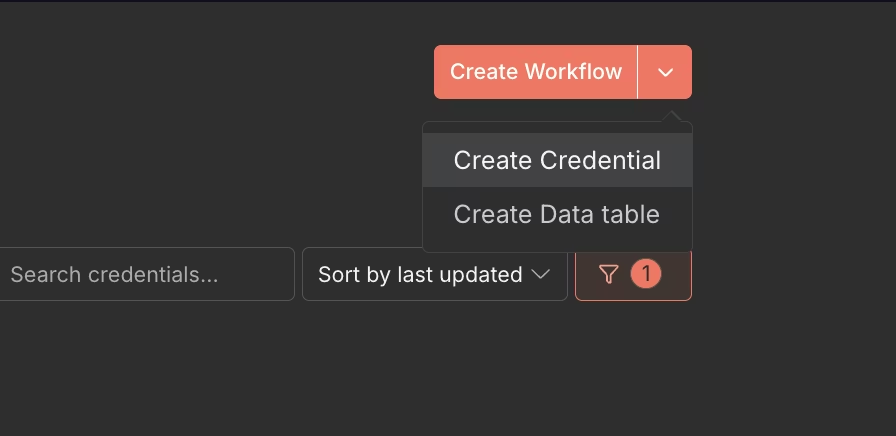
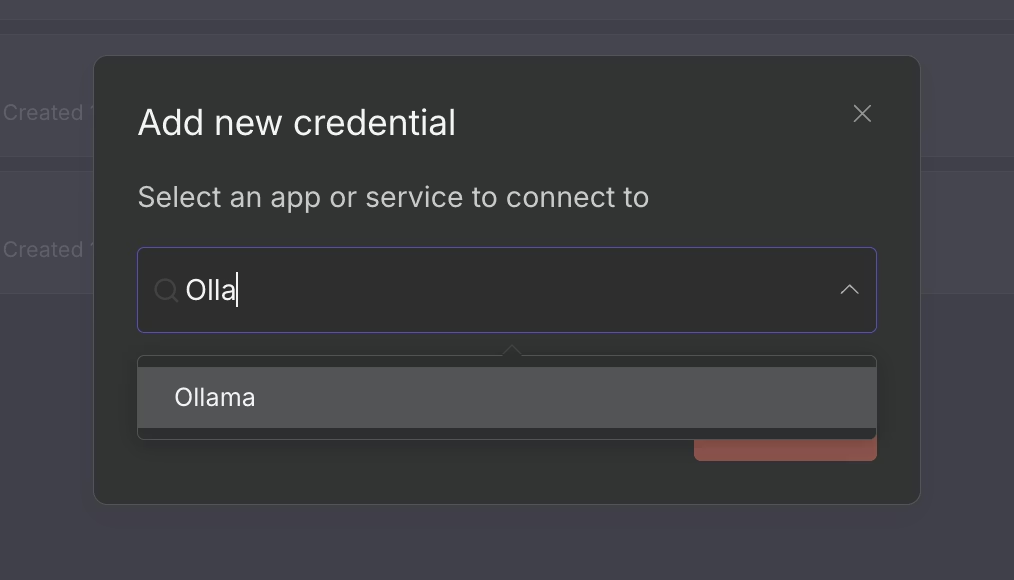
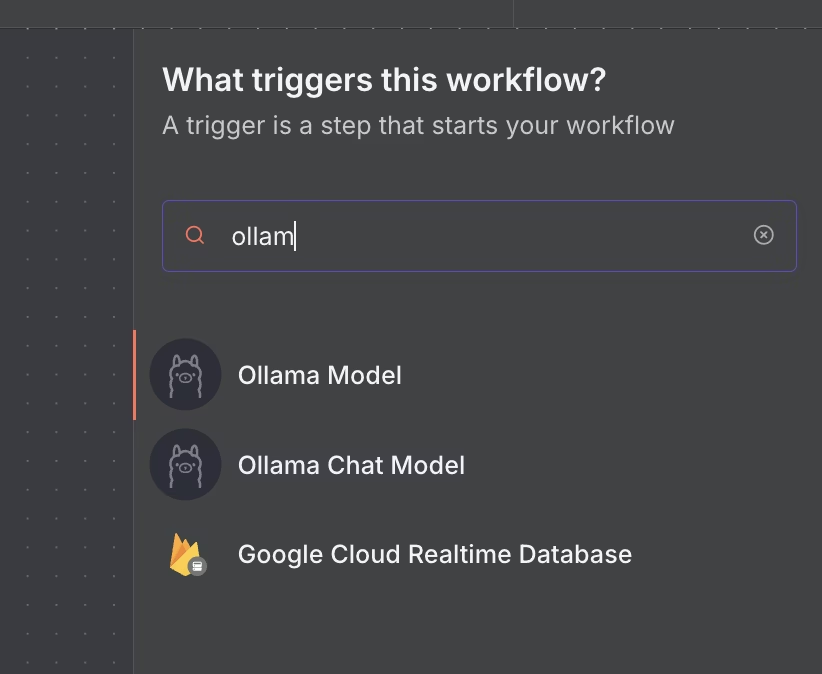
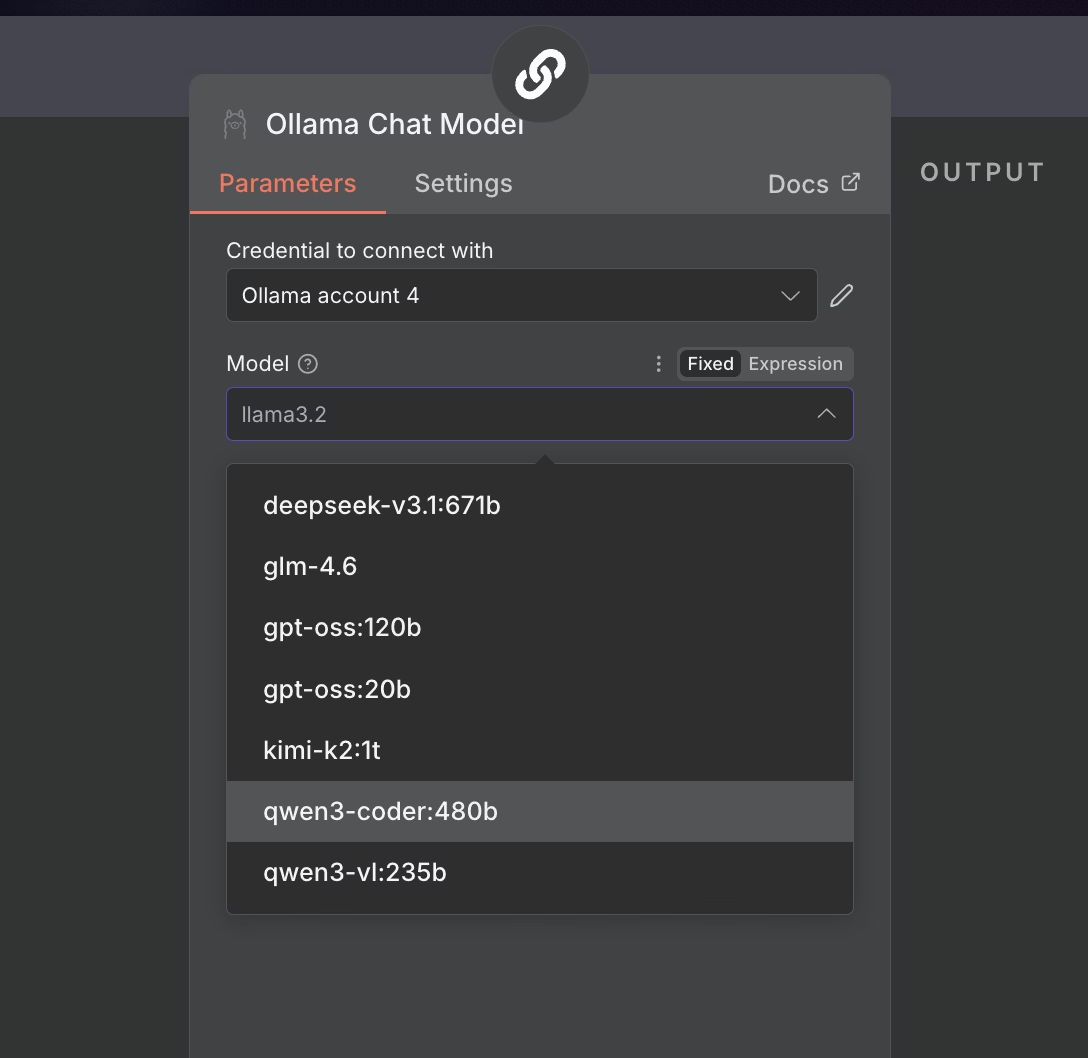
The screenshots below are published directly by Ollama on their official documentation. They show the exact steps to connect your self-hosted Ollama instance to n8n — the same process you follow on any VPS running these two tools together.
To make this concrete — here is the full stack that independent analysis in 2026 shows running on a $16–$25/month VPS:
Stack: Ollama + n8n + Coolify on a 4 vCPU / 8 GB RAM VPS
What each tool does:
- Ollama — runs local LLM inference, no API costs, no data leaving your server
- n8n — visual workflow automation connecting your AI to emails, databases, APIs, webhooks
- Coolify — manages SSL, git deployments, environment variables, replaces 2–3 hours of DevOps per month
What this replaces: ChatGPT Plus + Zapier AI + OpenAI API costs + vector database = $390–$690+/month for a small team
What it does NOT replace: Frontier model quality (Claude Opus, GPT-4o). If you need the best available reasoning quality, local 7B models are not equivalent. Self-hosting is the right choice for volume workloads, privacy requirements, and cost optimisation — not for tasks requiring frontier model performance.
Source: use-apify.com self-hosted AI stack cost analysis, 2026
Minimum VPS spec for this stack:
- 4 vCPU / 8 GB RAM / 80+ GB NVMe SSD
- Ubuntu 22.04 or 24.04 LTS
- Docker and Docker Compose installed
- Ports 11434 (Ollama), 5678 (n8n), 3000 (Open WebUI) open in firewall
Monthly cost comparison for this spec:
| Provider | Plan | Monthly Cost | Notes |
|---|---|---|---|
| Hetzner | CX31 | ~€9.68 | Best value, EU/US only |
| Contabo | VPS M | ~$12 | Best RAM/$ but variable CPU |
| Vultr | Regular 8 GB | ~$40 | More regions, consistent CPU |
| DigitalOcean | Droplet 8 GB | ~$48 | Best docs, managed services |
Security Considerations for Self-Hosted AI
By default Ollama listens only on localhost — which is correct. A common mistake when setting up n8n + Ollama is configuring Ollama to accept connections on all interfaces (0.0.0.0) without a firewall. This exposes your AI inference endpoint to the public internet, allowing anyone to use your VPS for free inference at your expense.
Correct approach: Keep Ollama on localhost or restricted to your Docker network only. Use UFW firewall rules to deny external access to port 11434. Only n8n running on the same server should access Ollama directly.
Source: Ollama official documentation and n8n integration guide
Five security basics for every self-hosted AI VPS:
- Enable UFW firewall and explicitly deny ports 11434 and any other internal service ports from public access
- Use SSH key authentication — disable password authentication
- Keep your OS and Docker images updated — run
apt update && apt upgradeweekly - Use a reverse proxy (Nginx or Caddy) with SSL for any services you expose publicly
- Enable automatic security updates for critical packages
7 Questions to Ask Before Choosing a VPS for AI Workloads
1. What is the actual RAM on the plan I can afford? Do not assume. Check the specific plan specs. 8 GB RAM minimum for 7B models.
2. Is the CPU shared or dedicated? Shared CPU means variable performance under load. Dedicated CPU means consistent inference times. Ask specifically or check plan descriptions carefully.
3. What is the clock speed on compute instances? Standard is 2–2.5 GHz. Vultr High Frequency offers 3+ GHz. For inference-heavy workloads, clock speed matters more than core count.
4. What data centre is closest to my users? AI inference latency adds to network latency. A server in Germany serving users in India will feel slower than the inference time alone suggests.
5. How much bandwidth is included? Pulling a 7B model = ~5 GB download. Running multiple models means multiple large downloads. Hetzner and Contabo include 20–32 TB. Vultr and DigitalOcean include 2–4 TB.
6. Is there a managed Kubernetes or container service? If you plan to scale beyond a single server, managed Kubernetes (available on DigitalOcean and Vultr) reduces operational complexity.
7. What is the cancellation and billing model? Hetzner uses hourly billing — delete your server and billing stops immediately. This matters for experimentation where you spin servers up and down.
Frequently Asked Questions
What is the minimum VPS spec to run Ollama and n8n together?
Minimum 4 vCPU / 8 GB RAM / 80 GB NVMe SSD. The 8 GB RAM is the hard floor — below this you will encounter memory errors when loading 7B parameter models alongside n8n. At this spec you can run Llama 3.1 8B or Mistral 7B comfortably for personal or low-concurrency use. For 10 concurrent users, upgrade to 8 vCPU / 16 GB RAM.
Can I run AI tools on a $5/month VPS?
For very small models — 3B parameters or less — a 4 GB RAM $5–$10/month plan can work. For Llama 3.1 8B or similar 7B models, 4 GB RAM is insufficient. You will hit memory errors. The practical minimum for useful AI workloads is an 8 GB RAM plan, which starts at ~€9.68/month on Hetzner — the most affordable option that meets this requirement.
Do I need a GPU VPS for self-hosted AI?
No — for personal or small team use. CPU inference on a modern VPS handles 7B models well enough for practical automation workflows. GPU VPS instances start at $100–500+/month, which eliminates most of the cost advantage of self-hosting. GPU makes sense for production applications serving many concurrent users or for fine-tuning models — not for typical n8n + Ollama automation stacks.
Is Hetzner reliable enough for production AI workloads?
Yes for most definitions of production. Hetzner offers 99.9% uptime SLA, NVMe storage on all plans, and consistent CPU performance with very low variance in independent benchmarks. The limitations are geographic — EU and US data centres only — and support response times can be slower than DigitalOcean or Vultr. For production workloads with global users, Vultr’s broader geographic coverage is worth the premium.
What is the difference between Ollama and LocalAI?
Both run local LLM inference. Ollama is simpler — one command to pull and run a model, clean API, excellent n8n integration. LocalAI is more flexible — supports more model formats, more configuration options, better suited for advanced use cases. For most users starting with self-hosted AI, Ollama is the right choice. LocalAI makes sense if you need specific model formats or advanced configuration that Ollama does not support.
Can I run my existing content pipeline on a self-hosted VPS?
Yes — with caveats. A self-hosted Llama 3.1 8B on a good VPS produces quality comparable to GPT-3.5 for most tasks. For content generation, summarisation, classification, and structured data extraction, local models perform well. For complex reasoning, code generation, or tasks requiring frontier model quality, cloud APIs (Groq, Anthropic, OpenAI) still have an edge. A hybrid approach — local models for volume tasks, cloud APIs for quality-critical tasks — is often the most cost-effective architecture.
How do I transfer my data if I want to switch VPS providers?
VPS migration is straightforward compared to managed hosting migration. You SSH into your old server, compress your application data and n8n workflows, copy them to your new server using scp or rsync, and redeploy your Docker containers. Hetzner, Vultr, DigitalOcean, and Contabo all use standard Linux environments — there is no proprietary lock-in. The entire process typically takes 1–3 hours depending on data volume.
Our Bottom Line
Hetzner — the default recommendation for most self-hosted AI use cases in 2026. Best CPU value per dollar by a wide margin, consistent performance, generous bandwidth, NVMe on all plans. The only reasons to choose a different provider are geographic requirements or need for managed services.
Vultr — when you need global data centre coverage or the fastest CPU inference available on a VPS. High Frequency instances at 3+ GHz are the best CPU option for inference-heavy workloads without a GPU. Pay the premium only if inference speed is genuinely critical.
DigitalOcean — when you are new to VPS hosting and value excellent documentation and managed services over raw compute value. The developer experience advantage is real. The compute value disadvantage is also real. Worth it if operational simplicity matters more than cost optimisation.
Contabo — when you need maximum RAM on minimum budget for development and experimentation. 16 GB RAM at $12/month is unmatched. Acceptable CPU consistency for personal workloads. Not the right choice for consistent production traffic.
Cloudways on DigitalOcean — when you want cloud infrastructure quality without managing a server. The managed layer eliminates most operational overhead at a cost premium.
From $6/mo · 3+ GHz High Frequency · 32 data center locations
From $4/mo · Managed services · Extensive docs · Strong ecosystem
From $7.50/mo · 16GB RAM from $12/mo · Best for dev and testing
Related: Best hosting for WooCommerce stores doing serious volume. | Switching hosts? Here is what to watch for. | Best hosting for Indian businesses.
Image Credits & Data Sources
Data Sources
- CPU events per dollar benchmark, CPU variance data, disk I/O comparison across Hetzner, DigitalOcean, Vultr, and other providers: aimultiple.com VPS benchmark study, 2026 — aimultiple.com/vps-benchmark
- Self-hosted AI stack cost analysis ($12–$25/month Ollama + n8n + Coolify), RAM requirements by model size, concurrent user scaling specs: use-apify.com — use-apify.com/blog/self-host-ollama-n8n-coolify-vps
- Ollama and n8n integration, RAM requirements, port configuration, Docker setup: Ollama official documentation — ollama.com and n8n official documentation — n8n.io
- Ollama model management, n8n integration guide, Contabo VPS deployment details: Contabo engineering blog — contabo.com/blog/what-is-ollama-and-how-to-use-it-with-n8n
- Hetzner 2026 price increases (30–37%), bandwidth comparison, value assessment: independent analysis published at bitdoze.com, February 2026
- DigitalOcean infrastructure positioning vs Hetzner and Vultr, managed services overview: DigitalOcean official documentation — digitalocean.com/resources
- Vultr High Frequency compute specifications, global data centre footprint: Vultr official documentation — vultr.com