We Tested Kinsta's Redis Add-On on a WooCommerce Store — Twice, With Before-and-After Numbers
Real MyKinsta screenshots, the actual billing modal, a GTmetrix before/after, and an alternating Redis OFF/ON concurrent-load test on a live WooCommerce Shop page. Here's what we measured — and what didn't move.
Written by Tom George · How we research hosts
Disclosure: Kinsta provided the free test account used in this guide, and we paid nothing, including for the Redis add-on. We also earn a commission if you sign up through our links. Our figures come from our own tests.
Data transparency: every screenshot, price, and performance number below comes from a live Kinsta test account, a live GTmetrix test, and a browser-based concurrent-load test we ran in September 2026 — not from Kinsta's marketing copy. The one claim in this guide we didn't test ourselves — why Redis helps under load — is quoted directly from Kinsta's own product description and labeled as their claim, not ours.
Why We Tested This Instead of Just Explaining It
Quick Answer: We enabled Kinsta’s Redis add-on on a live WooCommerce test site and tested it two ways: a GTmetrix before/after on the Shop page, and a concurrent-load test that switched Redis OFF, ON, OFF, ON so run order couldn’t skew the result.
Neither test showed a measurable benefit, and the alternating test showed no reliable cost either. We also confirmed the full-page cache was out of the way on that page, so PHP, MySQL and Redis did the work every time.
That is a result for a small demo store, not proof Redis never helps. Keep reading for exactly what we did, what we didn’t, and who $100/month is actually for.
Most "enable Redis for WooCommerce" guides describe the feature and stop there — install this, click that, enjoy a faster site. None of them show you a real before/after test on the same page, because that means actually enabling the add-on and measuring the result.
We did that, and then we kept going. We enabled Kinsta's Redis add-on on a WooCommerce test site (the Kinsta-provided account noted above), confirmed it was genuinely connected in WP admin, and tested the same 88-product Shop archive page two independent ways.
The walkthrough below is the exact click-path and billing commitment, with real screenshots. After that come the cache check, both tests, and the limits of each.
Step 1: Where Redis Actually Lives in MyKinsta (and What It Costs)
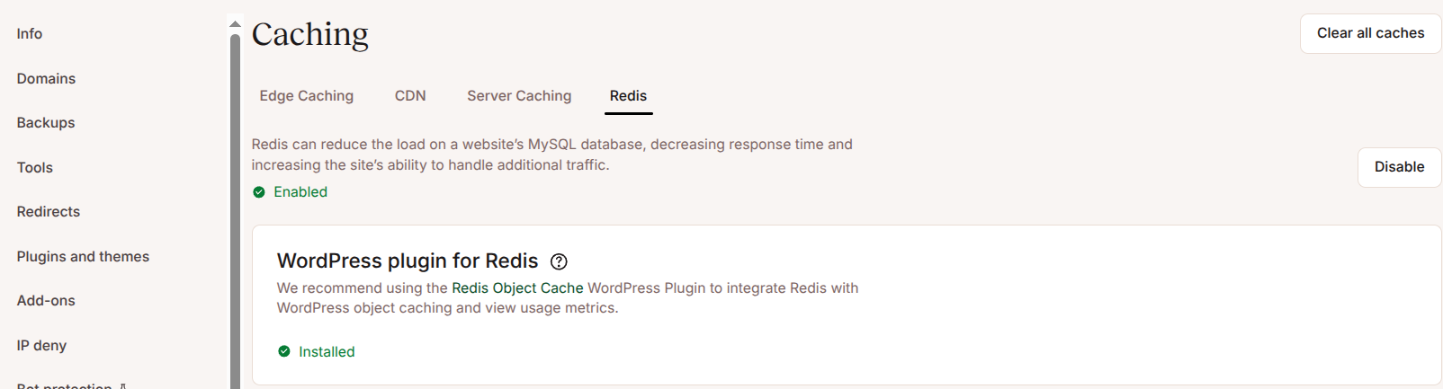
Redis isn't its own sidebar item in MyKinsta — it's a sub-tab. The path is your site → Caching in the sidebar → the Redis tab, alongside Edge Caching, CDN, and Server Caching.
Before you click anything, the page tells you exactly what you're signing up for. Kinsta's own copy: "Redis can reduce the load on a website's MySQL database, decreasing response time and increasing the site's ability to handle additional traffic." Underneath that, a single price badge: 100 USD / month. One button: Enable.

Step 2: The Billing Commitment You're Actually Agreeing To
Clicking Enable doesn't turn Redis on immediately — it opens a confirmation modal titled "Enable Redis Add-on," and this is the part worth reading slowly before you click through it.
The modal's "What will happen" box states, verbatim: "Redis Object Cache WordPress plugin will be installed on your site automatically," that the add-on "will appear on your next invoice… includ[ing] the prorated cost for this billing period and the full cost for the next billing period," and that "the subscription for this add-on will auto-renew and the payment method will be charged until canceled via MyKinsta."
A "Price details" box below it spells out the math plainly: 1 × Redis add-on at 100 USD/month, 0% tax, 100 USD total. Two buttons: Cancel, or Enable Redis Add-on.
We're stating this plainly because it deserves to be stated plainly: this is a genuine recurring-billing commitment on a normal paid account, not a free trial. Our Kinsta-provided test account has no payment method on file; on a regular paid account, this charges your card every month until you disable it.
Turning it off has its own confirmation. The "Disable Redis Add-on" modal on our test account said the add-on subscription would be canceled and a prorated fee for the time it was enabled would appear on the next invoice. Kinsta's docs say that applies in the first 30 days of a plan; after 30 days you get a prorated credit to your Account Balance instead. On our test site, disabling it also removed the Redis Object Cache plugin from the WordPress plugin list, and enabling it again put the plugin back.
Step 3: Enabling Redis — What Happens Automatically
Once you confirm, the Enable button switches to a disabled, spinner state. The first time we enabled it, it took roughly 15-20 seconds to finish provisioning.
On later toggles it was slower: the button spun for 30 seconds or more, and MyKinsta's Dashboard "Recent activity" list took a minute or two to show the change as done. Budget a couple of minutes, and check WordPress rather than assuming something's broken.
When it finished, the page updated to a green "✓ Enabled" status, the button changed to "Disable," and a new card appeared: "WordPress plugin for Redis," recommending the Redis Object Cache plugin, already marked "✓ Installed."
That's the detail worth calling out: the plugin installs itself as part of enabling the add-on. There's no separate manual plugin-install step, which matches what Kinsta's own documentation claims and is now confirmed live, not just on paper.
Step 4: Confirming It's Actually Working (Not Just Installed)
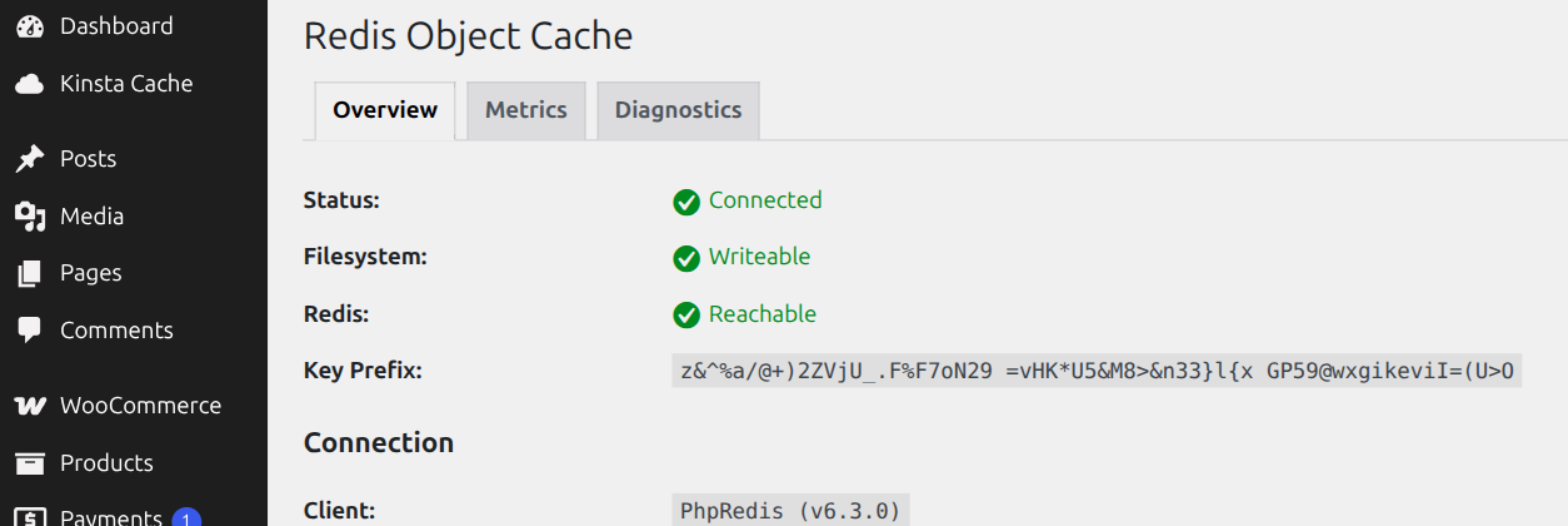
An installed plugin isn't the same as a working connection, so we checked the Redis Object Cache plugin's own status page in WP admin (Settings → Redis) rather than taking the green checkmark on faith.
Diagnostics tab, confirmed live: Status: Connected. Filesystem: Writeable. Redis: Reachable. Client: PhpRedis (v6.3.0), Host 127.0.0.1, Port 6379. That's a real, working connection, not just a plugin sitting inactive.
One aside worth knowing before you rely on this plugin's own metrics screen: it includes a comparison line against Object Cache Pro, a separate paid product from the same plugin author. It's an upsell baked into the free plugin's UI, not something Kinsta requires — the free version we tested works fine on its own.
A MyKinsta detection lag to know about
This is why the WP admin check matters. A few minutes after we re-enabled Redis, MyKinsta's Redis tab showed "Enabled" but also "Redis Object Cache WordPress plugin not detected," with a Reinstall button.
At the same moment, WP admin showed the plugin active, the object-cache drop-in in place, and Status: Connected. The warning was a dashboard detection lag, not a broken setup. We didn't click Reinstall, so we can't say what it would have done.
If you're verifying your own Redis setup, treat the WordPress-side status as the source of truth. Next: was Redis actually in the request path for our tests?
First, Was the Page Cache Out of the Way?
A Redis test is only meaningful if the request actually reaches PHP and MySQL. If Kinsta's full-page cache served the Shop page as a ready-made copy, Redis would never be touched and any test would show nothing.
So we checked the x-kinsta-cache response header directly. On the Shop archive it read BYPASS on every request we made — with cookies, and with zero cookies sent.
To rule out our URL style as the cause (the test site uses Plain permalinks, so URLs look like ?page_id=7), we ran the same check on non-WooCommerce pages that use the same style of URL. Those were served from cache.
| Page | Cookies sent | x-kinsta-cache |
|---|---|---|
Shop archive (?post_type=product) |
None | BYPASS (every request) |
| Shop archive | Logged-in session | BYPASS (every request) |
Sample page (?page_id=2) |
None | HIT |
Sample post (?p=1) |
None | MISS, then HIT |
Homepage (/) |
None | HIT |
Header checks run from a Chrome tab against the FBWH Kinsta test site, September 24, 2026. "HIT/MISS/BYPASS" are the values Kinsta's x-kinsta-cache header returned.
So the Shop bypasses the page cache on its own, with or without a login cookie, and our URL style isn't the reason — pages with the same URL style cache normally. Why it bypasses is our inference: shop pages are commonly kept out of full-page caches by design, but we didn't confirm that against Kinsta's documentation.
What matters for Redis: on the Shop page, PHP and MySQL ran on every request we made, so Redis had real work available in both tests below.
Test One: A Same-Page GTmetrix Before/After
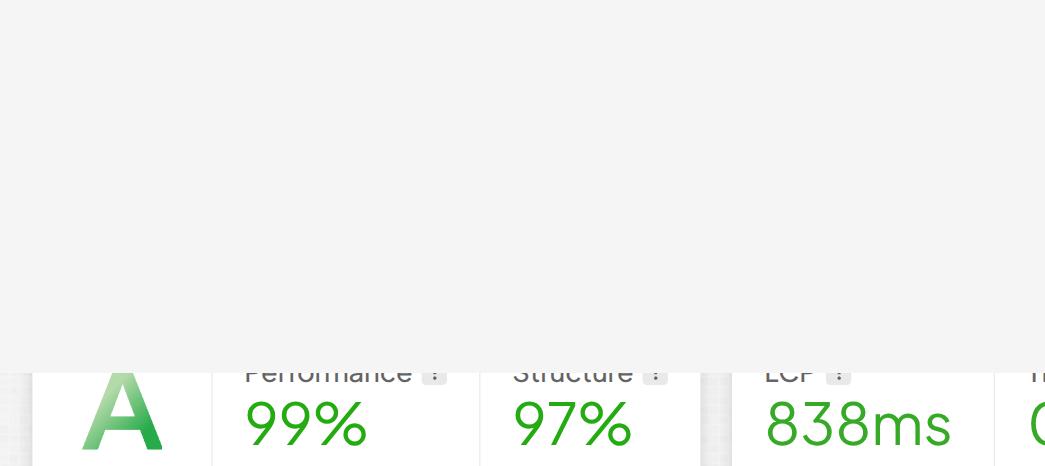
The first test is the one most Redis tutorials skip. We tested the same page twice — once with Redis off, once with Redis on — using GTmetrix (anonymous tier, Seattle WA test server both times) against our test site's WooCommerce Shop archive, which carries the standard 88-product WooCommerce sample catalog. We used the Shop archive specifically because it's a real database-querying page, not the lighter single-post homepage a synthetic test might default to.
| Metric | Redis OFF | Redis ON |
|---|---|---|
| GTmetrix Grade | A | A |
| Performance | 99% | 98% |
| Structure | 97% | 97% |
| LCP | 838ms | 862ms |
| TBT | 0ms | 0ms |
Both tests: GTmetrix anonymous tier, Seattle WA test server, same Shop archive URL, September 2026. Full Redis-off report: gtmetrix.com/reports/fbwhkinstatest.kinsta.cloud/gWOpel9U.
Test Two: Alternating Concurrent Load (OFF, ON, OFF, ON)
Kinsta's own description says Redis reduces database load and helps a site handle more traffic. That's a claim about many requests at once, so we tested it that way: 20 requests running at the same time against the Shop archive, for 20 seconds per pass.
We ran four passes and switched Redis between each one — OFF, ON, OFF, ON — so that a slow or fast stretch on the server couldn't line up with one Redis state. We confirmed the Redis state before each pass — in MyKinsta's activity list and, from pass 3 on, on the WordPress side too (plugin present or absent, and Status: Connected when on).
| Pass | Redis | Requests | Req/sec | Avg | p95 |
|---|---|---|---|---|---|
| 1 | OFF | 584 | 28.2 | 697ms | 1,108ms |
| 2 | ON | 482 | 23.3 | 845ms | 1,491ms |
| 3 | OFF | 556 | 26.8 | 731ms | 1,267ms |
| 4 | ON | 598 | 28.8 | 681ms | 1,073ms |
2,220 requests across the four passes. Every response was HTTP 200 with x-kinsta-cache: BYPASS — zero errors, zero Cloudflare challenges. Run September 24, 2026 from one Chrome tab.
The two OFF passes averaged 714ms and the two ON passes 763ms. That 7% gap is smaller than the gap between the two ON passes themselves (681ms vs 845ms), and the final ON pass was the fastest of all four. There's no consistent Redis-linked pattern in either direction.
The result we don't count on — and why we're showing it
Our first attempt wasn't alternated. We ran OFF once, then ON twice in a row, and the two ON runs came back far slower: about 1,650ms average against 710ms for OFF, and roughly 12 requests a second against 28.
That looked like "Redis makes it 2.3× slower." It didn't reproduce: once we switched Redis on and off repeatedly, ON was 845ms and then 681ms. We don't know what caused those two slow runs — server or network conditions at the time is our best guess, and it is only a guess. It's the reason we alternated, and it's why we base the conclusion on the alternating passes, not on either of those first runs.
This was moderate concurrent load generated from a browser session — 20 parallel requests from one Chrome tab — not a dedicated load-testing tool. Cloudflare’s bot challenge blocked a plain command-line request to this site, so we used the browser instead of a dedicated tool.
The tab was logged in to WordPress as an admin, so these were logged-in requests, not anonymous shopper traffic. We ran two passes per Redis state, on one day, against a small demo store. Treat it as indicative, not as a benchmark.
Why a Null Result Is Plausible Here (and What It Doesn't Prove)
Both tests point the same way, and there are ordinary reasons for that. Our test site is a small demo store: an 88-product sample catalog, no real visitors, and, in our read, a database with little repeated work for an object cache to save.
There's also a measurement floor. Every request in the concurrent test took roughly 400-700 milliseconds or more from our location, most of which we'd attribute to network travel to the server. A saving of a few milliseconds of database time would disappear inside that, even if it were real.
This doesn't prove Redis never helps. Kinsta's claim — "decreasing response time and increasing the site's ability to handle additional traffic" — is about a production database under real, sustained shopper traffic, with a bigger catalog and repeated cart and checkout queries. We didn't test that, and a small demo store can't.
What we can say: on a small WooCommerce store, with the page cache out of the way and Redis confirmed connected, two independent first-hand tests found no measurable benefit from a $100/month add-on. Next, what that means for whether you should pay for it.
Should You Pay $100/Month for Redis? A Decision Framework
Skip Redis if
- You're a low-to-moderate traffic WooCommerce store with no signs of a database bottleneck
- Your GTmetrix or PageSpeed scores are already solid without it
- You can't point to a specific slow moment (checkout spikes, sale-day traffic) it would actually fix
Redis likely matters if
- You run flash sales or high-volume checkout traffic that hits your database concurrently
- You're an agency running several resource-heavy WooCommerce sites on one plan
- Your own APM or server metrics already show real MySQL load under production traffic — not a quiet test site
If you're in the second column, the right next step isn't to take our word for it either — enable it on your own site for a billing cycle and watch your own APM and checkout-page metrics under real traffic, the same way we watched ours.
If you do, confirm it on the WordPress side (Settings → Redis, Status: Connected) rather than relying on MyKinsta's status alone, and check Kinsta's disable terms in Step 2 first (a prorated fee in a plan's first 30 days, a prorated credit to your Account Balance after).
Frequently Asked Questions
Does enabling Redis actually make WooCommerce faster on Kinsta?
Not measurably, in our own tests. A GTmetrix before/after on the WooCommerce Shop page (838ms LCP off, 862ms on) and a four-pass concurrent-load test that alternated Redis OFF, ON, OFF, ON both showed no consistent benefit, and no reliable cost either. That's a result for a small demo store, not proof Redis never helps on a busy production site.
How much does Kinsta's Redis add-on cost?
$100 USD per month, billed as a recurring add-on to your hosting plan. Kinsta's own confirmation modal states it will appear on your next invoice at a prorated cost for the current period plus the full cost for the next one, and that it auto-renews until you cancel it in MyKinsta.
Does Kinsta's Redis add-on require any manual setup?
No. Clicking Enable in MyKinsta provisions the add-on and installs the Redis Object Cache WordPress plugin for you. The first time took 15-20 seconds, but on later toggles MyKinsta took up to a couple of minutes to show it finished, and WP admin showed Status: Connected with no extra configuration.
Was the WooCommerce Shop page cached when you tested Redis?
No. The Shop archive returned x-kinsta-cache: BYPASS with and without cookies, while non-WooCommerce pages on the same site were served from cache (HIT). So PHP and MySQL ran on every request we made, and Redis was in play.
Why does MyKinsta say the Redis plugin is not detected after I enable Redis?
After we re-enabled Redis, MyKinsta's Redis tab showed Enabled but also "Redis Object Cache WordPress plugin not detected" with a Reinstall button, while WP admin showed the plugin active and Status: Connected. That was a MyKinsta dashboard detection lag, not a broken setup, so check the Redis page under Settings in WP admin before you click Reinstall.
Is Kinsta's free Redis Object Cache plugin different from Object Cache Pro?
Yes. The free Redis Object Cache plugin that auto-installs with Kinsta's add-on works fine and is what we tested, but its own metrics screen includes an upsell comparison against Object Cache Pro, a separate paid product from the same plugin author. Object Cache Pro is an optional upgrade, not something Kinsta requires.
Who should actually pay for Redis on Kinsta?
Sites with real concurrent database load — high-traffic WooCommerce stores during sales events, or agencies running several resource-heavy sites on one plan. If your site is low-to-moderate traffic and already scores well on GTmetrix or PageSpeed without it, our tests suggest the $100/month is unlikely to buy you a measurable improvement.
Bottom Line
Kinsta's Redis add-on does what it says on the tin: it auto-installs cleanly, connects, and works as advertised. What it didn't do, in two independent first-hand tests on the same WooCommerce Shop page, was produce a measurable improvement — not in a GTmetrix before/after, and not in an alternating concurrent-load test.
We were careful about what those tests can and can't show. The page cache was confirmed out of the way, the Redis state was verified each time, and the one result that looked like a slowdown didn't survive alternating the order. But it's a small demo store, tested from a browser, and that's the honest limit.
If your WooCommerce store genuinely runs into concurrent database load — sale-day traffic, an agency's multi-site plan, a checkout flow that bogs down under real visitors — Redis is a reasonable $100/month to test on your own traffic. If you're paying for it on a quiet site hoping it'll move a speed number, our data says don't expect it to.
Related: WooCommerce Cart and Checkout Caching Problems | Full Kinsta Review | WooCommerce Hosting for High-Volume Stores
Data Sources
- MyKinsta Caching → Redis tab UI text, pricing, enable/disable confirmation modal wording, and provisioning behavior: first-hand FBWH testing on the free Kinsta-provided test account, September 2026.
- Redis Object Cache plugin auto-install and WP admin Diagnostics tab (Connected/Reachable/PhpRedis v6.3.0): first-hand FBWH testing, same test account and session.
- Before/after GTmetrix results on the WooCommerce Shop archive page: first-hand FBWH testing — Redis-off report, gtmetrix.com, September 2026.
- x-kinsta-cache header checks (Shop archive with and without cookies; non-WooCommerce control pages): first-hand FBWH testing, browser fetch requests, September 24, 2026. The reason the Shop bypasses the cache is FBWH inference, not confirmed against Kinsta documentation.
- Alternating concurrent-load test (Redis OFF/ON/OFF/ON, 20 parallel requests for 20 seconds per pass, 2,220 requests): first-hand FBWH testing, JavaScript fetch requests from one Chrome tab that was logged in to WordPress as an admin — not a dedicated load-testing tool; two passes per Redis state, one day, September 24, 2026.
- MyKinsta "Redis Object Cache WordPress plugin not detected" message versus WP admin showing the plugin active and connected: first-hand FBWH observation, September 24, 2026; single occurrence, cause is FBWH inference.
- Redis add-on price ($100 per site per month), invoice timing, disable terms (prorated fee in the first 30 days of a plan, prorated credit after) and plugin auto-install: Kinsta docs, WordPress Hosting - Add-Ons and Redis Caching, plus the Kinsta pricing page, all re-read October 23, 2026.
- "Reduces the load on a website's MySQL database…" quote: Kinsta's own product description, captured live in the MyKinsta dashboard, September 2026 — provider claim, not independently verified by FBWH.