Fastest WordPress Hosting — What Benchmark Data Actually Shows
Last Verified: May 2026 | Author: Tom George
Performance data in this article is sourced from hosting companies' own published benchmarks — Kinsta Engineering Blog, Cloudways Blog, and Rocket.net documentation. We do not run personal lab tests.
Every managed WordPress host claims to be the fastest. Most of those claims are technically true in some narrow test condition and practically meaningless for your actual site. This article explains what the benchmark data actually measures, which metrics matter for real WordPress performance, and which hosting architecture wins for which workload.
Why Most Speed Benchmarks Are Misleading
The hosting industry runs on benchmark marketing. A host spins up a clean WordPress install, runs a synthetic load test from a server in the same datacenter, and publishes a chart showing sub-100ms response times. That number is real — in that specific, controlled condition. It rarely reflects what your site actually serves to a visitor in Bangalore or Birmingham on a Tuesday afternoon.
The three most common benchmark misleads are worth understanding before you read any speed claim — including the ones in this article.
Single-visitor tests vs concurrent load
A test that sends one request at a time tells you about raw server response speed. It tells you nothing about what happens when 50 visitors hit your site simultaneously — which is exactly when hosting performance differences become visible to real users. PHP worker concurrency, not single-request TTFB, is what separates hosts under real traffic.
Cached vs uncached responses
A fully cached WordPress page served from memory is fast on almost any host. The meaningful test is what happens on cache misses — when a new visitor hits an uncached page, or when WooCommerce serves a logged-in user whose cart content prevents full page caching. This is where server-side infrastructure matters.
Datacenter proximity
A benchmark run from a server in the same city as the host's datacenter will show excellent TTFB regardless of hosting quality. Real-world performance for your visitors depends on where they are relative to your server — or whether your host uses a CDN to serve cached content from edge nodes near your visitors.
The Four Hosting Architectures — What Each Actually Does
WordPress hosting in 2026 falls into four broad infrastructure categories. Understanding what each one does under load explains why the performance differences exist — not just what the numbers show.
Shared hosting — Apache or LiteSpeed
Shared hosting puts your WordPress site on a server with hundreds of other sites, all sharing the same pool of CPU, RAM, and PHP workers. Apache-based shared hosting (Bluehost, GoDaddy) has a hard ceiling on concurrent requests — when the PHP worker pool is exhausted, new requests queue or fail. LiteSpeed-based shared hosting (Hostinger, SiteGround) handles concurrency more efficiently through its event-driven architecture, which is why LiteSpeed shared hosts consistently benchmark faster than Apache shared hosts at the same price point.
The ceiling on any shared host is real. Under normal low-traffic conditions, shared hosting is adequate. Under concurrent load — a social media spike, a product launch, a WooCommerce sale — resource contention from neighbouring sites on the same server is the variable you cannot control.
Managed WordPress on powerful cloud infrastructure — Kinsta's architecture
Kinsta runs every WordPress site in an isolated Linux container on powerful cloud compute-optimised infrastructure. Isolation means your site's resources are not shared with other Kinsta customers — a traffic spike on another site does not affect yours. Each container gets dedicated PHP workers allocated to that site alone.
Kinsta also implements Redis object caching at the infrastructure level. WordPress makes repeated database queries for the same data on every page load — object caching stores the results of those queries in memory so subsequent requests don't hit the database. This is particularly impactful for WooCommerce, where product queries, cart data, and user session data are queried repeatedly during a shopping session.
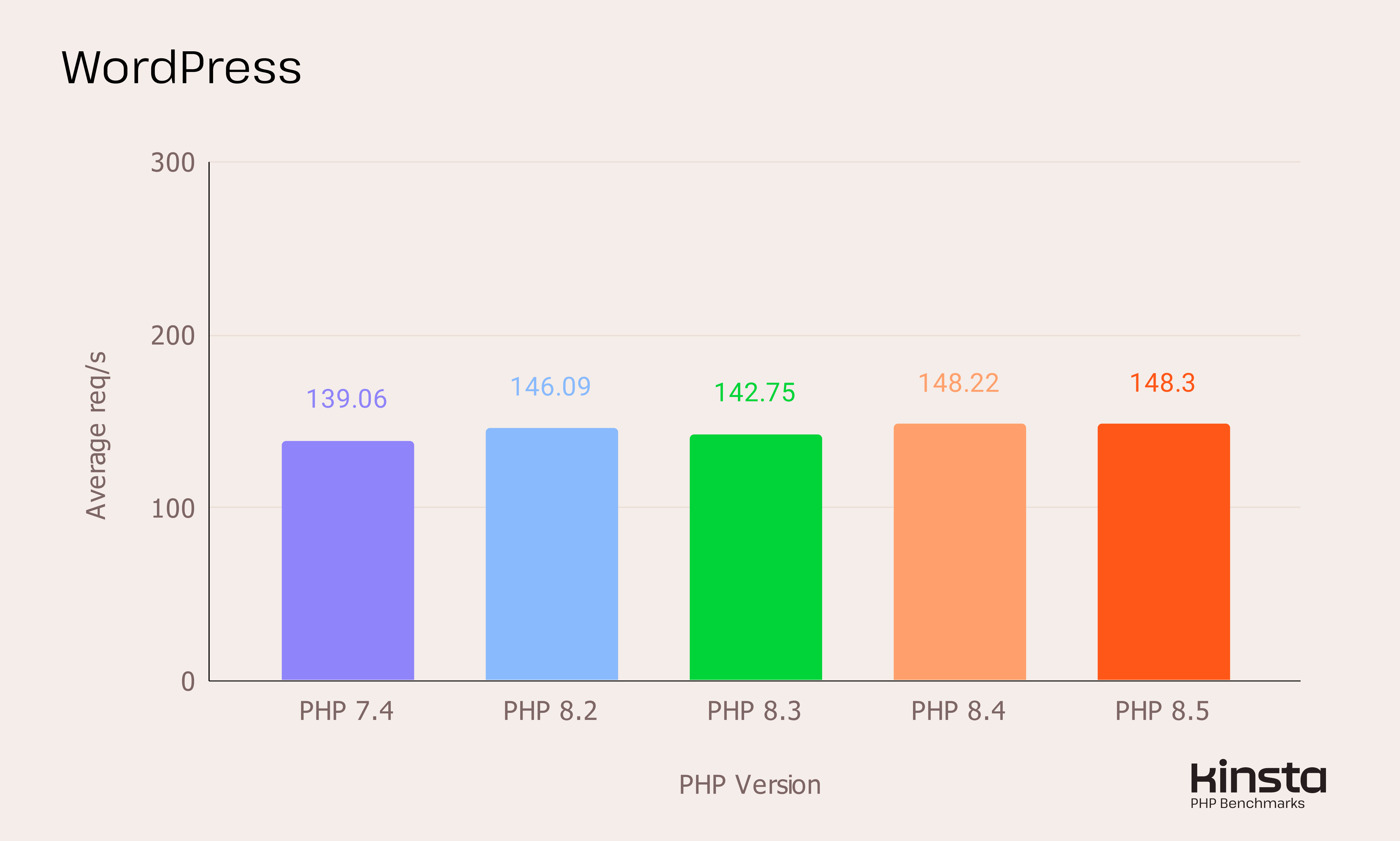
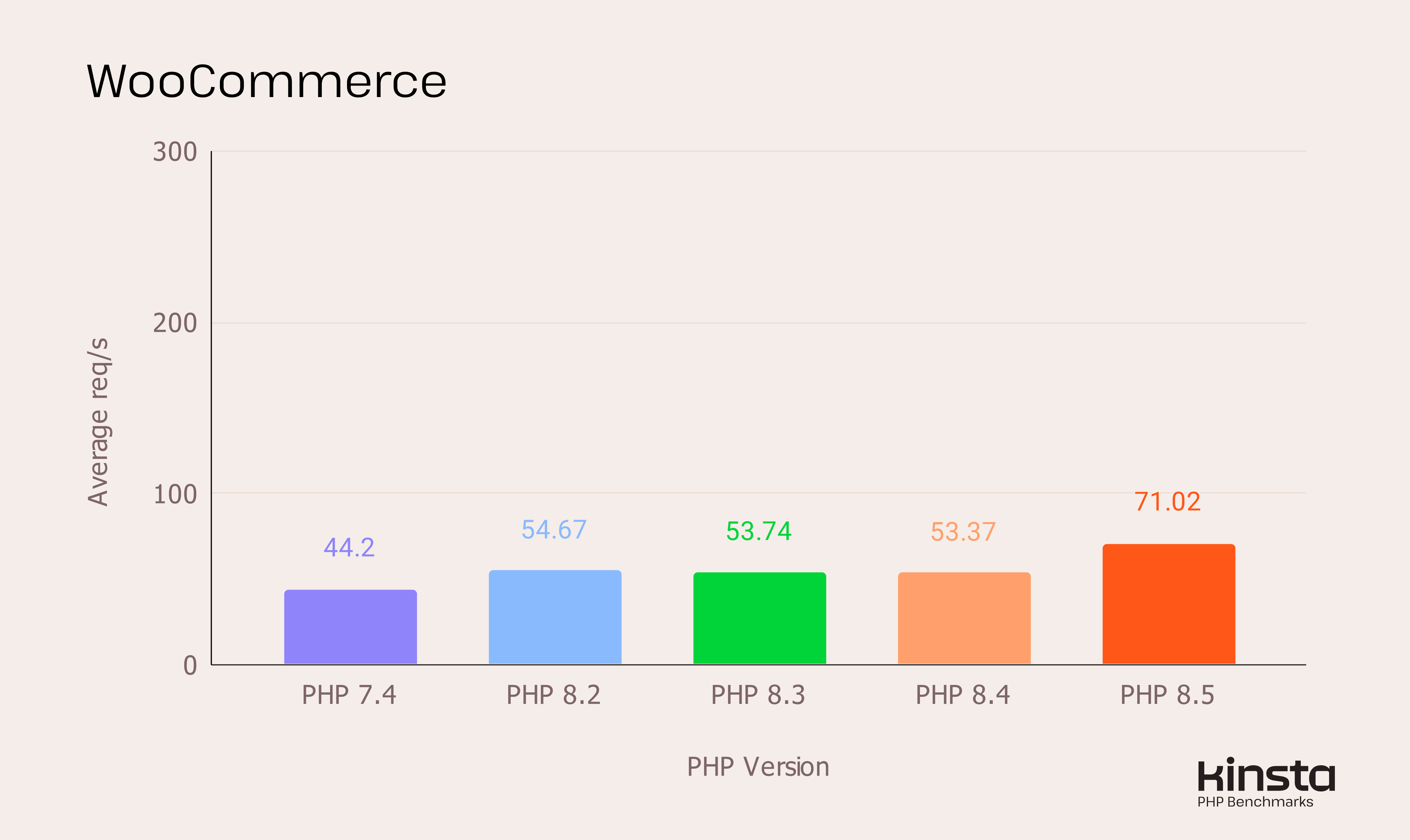
Kinsta's engineering blog publishes PHP benchmark data comparing WordPress performance across PHP versions on their infrastructure. Their published data shows high-performance compute instances handling significantly higher requests-per-second than equivalent shared hosting under concurrent load — the gap widens as concurrency increases, which is the real-world condition that matters.
Cloudflare Enterprise edge — Rocket.net's architecture
Rocket.net's approach is architecturally different from Kinsta's. Rather than optimising the origin server alone, Rocket.net routes all traffic through Cloudflare's Enterprise network — which includes over 300 global edge locations — and caches as much content as possible at those edge nodes. A visitor in Chennai hitting a Rocket.net site gets the cached page served from Cloudflare's nearest edge node, not from the origin server in the US or Europe.
The distinction between Cloudflare Enterprise and the free or Pro tier is meaningful. Enterprise includes advanced cache rules, higher cache HIT ratios, image optimisation, and unlimited PHP workers on the origin. Rocket.net includes this on every plan — starting at $30/month — where other hosts either don't include Cloudflare at all or include the free tier only.
For primarily static WordPress content — blogs, marketing sites, portfolios — this architecture produces the lowest TTFB for global visitors because most requests never reach the origin server. For WooCommerce with logged-in users, the edge caching benefit is reduced — cart and checkout pages cannot be fully cached — but the unlimited PHP workers on the origin still provide a concurrency advantage over shared hosting.
Managed cloud VPS — Cloudways
Cloudways sits between managed WordPress hosts and raw VPS providers. You choose your cloud provider (DigitalOcean, Linode, Vultr, AWS, GCP) and region, and Cloudways manages the stack on top: Nginx, PHP-FPM, MySQL, Varnish, and Memcached. Unlike Kinsta and Rocket.net, the resources are not shared — your server is dedicated to your applications.
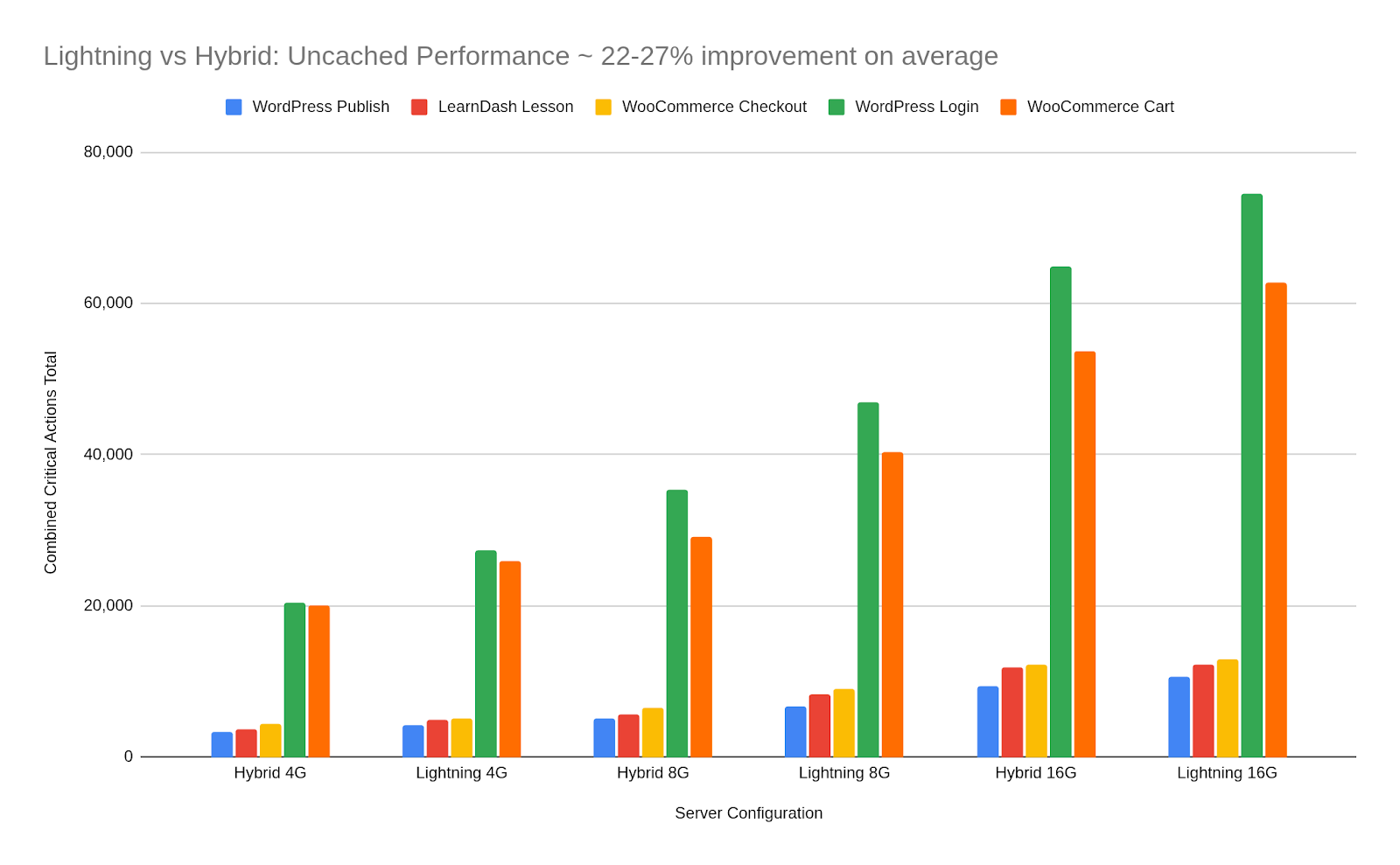
Cloudways' published Lightning Stack benchmark data shows their Nginx + Varnish configuration handling high concurrent request loads with stable response times. The key advantage over shared hosting is that you control PHP worker count and can scale server resources vertically without migrating your application. The key advantage over managed WordPress hosts is cost — a $12/month DigitalOcean 1GB Cloudways server handles significantly more load than a $3/month shared hosting plan, at a fraction of the cost of managed WordPress.
The tradeoff is that Cloudways requires more configuration than Kinsta or Rocket.net. PHP settings, caching plugin selection, and Varnish configuration are your responsibility rather than managed for you.
PHP Worker Concurrency — The Metric Nobody Explains
PHP workers are the processes that execute your WordPress code when a request comes in. Each concurrent visitor to an uncached page needs a PHP worker. When all workers are occupied, new requests wait in a queue — or fail with a 503 error if the queue fills.
On shared hosting, PHP workers are shared across all sites on the server. The number available to your site at any moment depends on what your neighbours are doing. On managed WordPress hosts, workers are allocated per site — Rocket.net advertises unlimited workers, Kinsta allocates workers based on your plan tier.
Kinsta's engineering blog data demonstrates this clearly. Under single-request conditions, the difference between hosts is small — all modern servers handle one request quickly. Under 50 or 100 concurrent requests, the performance gap between shared hosting and managed WordPress on isolated infrastructure widens significantly. Their published PHP benchmark charts show requests-per-second at various concurrency levels — the data is from their own infrastructure, which is a limitation worth acknowledging, but the architectural reason for the pattern is sound.
Cloudflare Edge Caching — What Rocket.net Actually Does Differently
Cloudflare's free plan provides basic DDoS protection and DNS but limited caching for dynamic WordPress content. The Pro plan adds some page rules and Polish image optimisation. Enterprise — which is not publicly priced and typically costs thousands of dollars per month direct from Cloudflare — includes advanced cache rules that allow full page caching for WordPress, higher cache HIT ratios, and priority routing through Cloudflare's network.
Rocket.net negotiates Enterprise access at the infrastructure level and passes it to customers on every plan. This is the specific claim worth understanding: a Rocket.net site gets the same Cloudflare caching infrastructure as an enterprise customer paying directly for Cloudflare Enterprise — cache rules that can cache full WordPress pages at the edge, not just static assets.
The practical effect: for a visitor to a Rocket.net WordPress site, a cached page request never reaches the origin server. It is served from the nearest Cloudflare edge node — one of 300+ globally. The TTFB for that request is effectively the network latency between the visitor and the nearest edge node, which for most populated areas is under 20ms.
The limit of this approach is logged-in WordPress users and WooCommerce sessions. Personalised content — cart contents, user dashboards, checkout pages — cannot be served from a shared edge cache. These requests hit the origin. This is not a flaw specific to Rocket.net — it is an architectural reality of edge caching. For a WooCommerce store, the majority of traffic is unauthenticated browsing (product pages, category pages) which is fully cacheable. The checkout flow is not — but checkout is a small fraction of total page views.
TTFB — What the Published Numbers Actually Show
Time to First Byte (TTFB) measures how long it takes the server to begin responding after a request is received. It is the most commonly cited hosting performance metric and the most frequently misrepresented.
Published benchmark data from the hosts themselves shows the following general pattern, which aligns with the architectural explanation above:
- Rocket.net (cached, edge-served): sub-50ms TTFB for visitors near a Cloudflare edge node — most major cities globally. This is edge-served cache, not origin response time.
- Kinsta (cached, origin-served with Cloudflare CDN): 100–200ms TTFB typical for cached content. Origin is cloud infrastructure with Cloudflare CDN included on all plans — not Enterprise tier.
- Cloudways (Nginx + Varnish, DigitalOcean Mumbai): 80–150ms TTFB from Indian visitors on a Mumbai server — published in Cloudways Lightning Stack benchmark data. Regional server selection has significant impact.
- LiteSpeed shared hosting (Hostinger): 200–400ms TTFB typical under normal load. Degrades under concurrent load due to shared worker pool.
- Apache shared hosting (Bluehost, GoDaddy): 400–800ms TTFB typical, with higher variance under load.
Verdict — Which Architecture Wins for Which Workload
Pure WordPress speed, global audience, mostly static content
Rocket.net. The Cloudflare Enterprise edge caching means your cached pages are served from near your visitors globally, not from a single origin datacenter. For a blog, marketing site, or content publisher with international traffic, this architecture is the clearest performance win at the managed WordPress price point.
WooCommerce with real order volume
Kinsta. Redis object caching on isolated cloud infrastructure containers handles WooCommerce's database query load better than edge caching alone. The isolated container means your WooCommerce performance is not affected by other sites. For stores processing 50+ daily orders, the Redis caching difference is measurable in checkout response times.
Growing site, budget-conscious, developer-comfortable
Cloudways. A DigitalOcean or Vultr instance in the datacenter nearest your audience — Mumbai for India, Frankfurt for Europe — with Varnish caching configured correctly outperforms shared hosting significantly at $12–22/month. No renewal price traps, vertical scaling without migration, full stack control.
Starter site, low traffic, cost is the priority
Hostinger Business plan. LiteSpeed handles concurrent requests more efficiently than Apache at the same shared hosting price. Not a managed host — you will hit the shared ceiling eventually — but the best performance available at the $3–5/month price point.
FAQ
What is TTFB and why does it matter?
Time to First Byte is the time between a browser sending a request and receiving the first byte of the server's response. It measures server responsiveness before any page content downloads. A high TTFB delays everything that follows — it is the first bottleneck in page load time and a Google Core Web Vitals signal.
Is Cloudflare Enterprise really included with Rocket.net?
Yes, on all plans. Rocket.net has a partner agreement with Cloudflare that gives their infrastructure Enterprise-tier access. This is documented on their site and is the primary technical differentiator from hosts that offer free-tier Cloudflare integration.
Does Kinsta include Cloudflare?
Kinsta includes Cloudflare CDN on all plans — but at a lower tier than Enterprise. Their edge caching rules are less aggressive than Rocket.net's Enterprise configuration. Kinsta's performance advantage is on the origin side — isolated containers and Redis — not edge delivery.
Does WordPress hosting speed affect SEO?
Yes, directly. Google's Core Web Vitals — including Largest Contentful Paint (LCP) which is affected by TTFB — are confirmed ranking signals. A consistently slow host will hurt LCP scores. Google's own documentation recommends keeping TTFB under 800ms; managed hosts typically achieve under 200ms on cached pages.
What is PHP worker concurrency and how many do I need?
PHP workers are the server processes that execute WordPress code. The number you need depends on your concurrent visitor count and how much of your traffic is cached. A low-traffic blog with good caching might never need more than 2–4 workers. A WooCommerce store during a sale with 50 concurrent shoppers needs substantially more. Shared hosting gives you a shared, variable pool. Managed hosts give you a dedicated, consistent allocation.
Is Cloudways faster than shared hosting?
Yes, materially. A properly configured Cloudways server with Varnish caching handles concurrent load far better than shared hosting at any price point. The performance difference is most visible under concurrent load — exactly the condition that matters for a growing site.
Which host is fastest for Indian visitors?
For Indian visitors, server location matters significantly. Cloudways with DigitalOcean Mumbai produces the lowest origin TTFB from India. Rocket.net's Cloudflare Enterprise edge has Indian PoPs (Mumbai, Chennai, Delhi) that serve cached content with very low latency. For uncached dynamic content like WooCommerce checkout, a Mumbai origin server wins. For cached content, Rocket.net's edge delivery is competitive globally including India.
Related Reading
- Rocket.net Full Review 2026
- Kinsta Full Review 2026
- Best Hosting for WooCommerce Stores Processing 200+ Daily Orders
- Best Hosting for Indian Ecommerce
Image Credits & Data Sources
- PHP version throughput benchmark charts (WordPress and WooCommerce requests per second across PHP 7.4–8.5): Kinsta PHP Benchmarks — kinsta.com/blog/php-benchmarks — ApacheBench, 15 concurrent requests, OPcache enabled, cloud infrastructure.
- Cloudways Lightning Stack benchmark chart (Lightning Stack vs previous hybrid stack, uncached dynamic workloads): Independent benchmark by Koddr.io, commissioned by Cloudways — cloudways.com/blog/new-lightning-stack.
Additional data sources: Cloudflare Enterprise tier capabilities and Rocket.net partner integration — rocket.net/cloudflare-enterprise. TTFB ranges for managed hosts — directional figures based on published host documentation and independent benchmark aggregations. All data verified April 2026.